
Your DayZ server is online, you have the IP in front of you, and the server browser returns nothing. This is the single most common first hour on a DayZ server, and it is almost never a broken server. DayZ hands out two different ports, and the one printed as your connection address is not the one Steam searches with. This guide covers the address that actually works, the three ways into your server on PC, how console players get there, and what each failure message really means.
What you need before you start
- Your server showing as running in the game panel
- The connection details from your server's Overview page
- DayZ installed, and Steam running if you are on PC
The two ports, and why this matters
Your server binds to a game port, usually 2302. That is the port the game itself plays on, and it is what the connection card shows you.
Steam and the DayZ server browser do not search on that port. They search on a separate query port, and a player who types the game port into Steam favorites gets an empty list every time. Nothing is wrong with the server. Steam simply asked the wrong door and nobody answered.
Your panel already knows this. On the Overview page, under the connection card, there is an Add to Steam favorites block showing the query address. That is the address you want, and it is the one to hand out to friends who are adding the server manually.
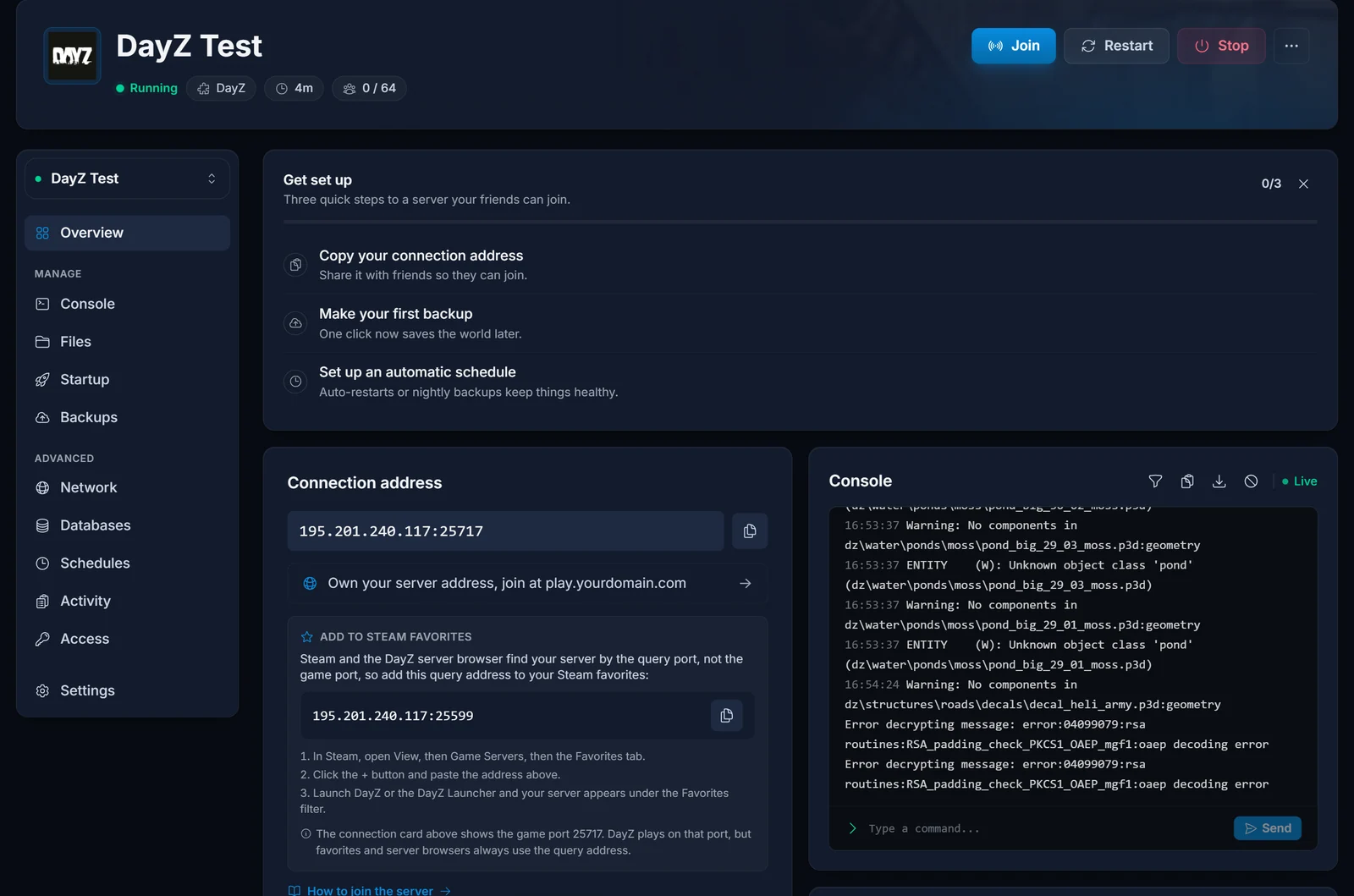
Copy it now. Everything below uses it.
Method 1: Steam favorites
This is the reliable route, and it survives server restarts.
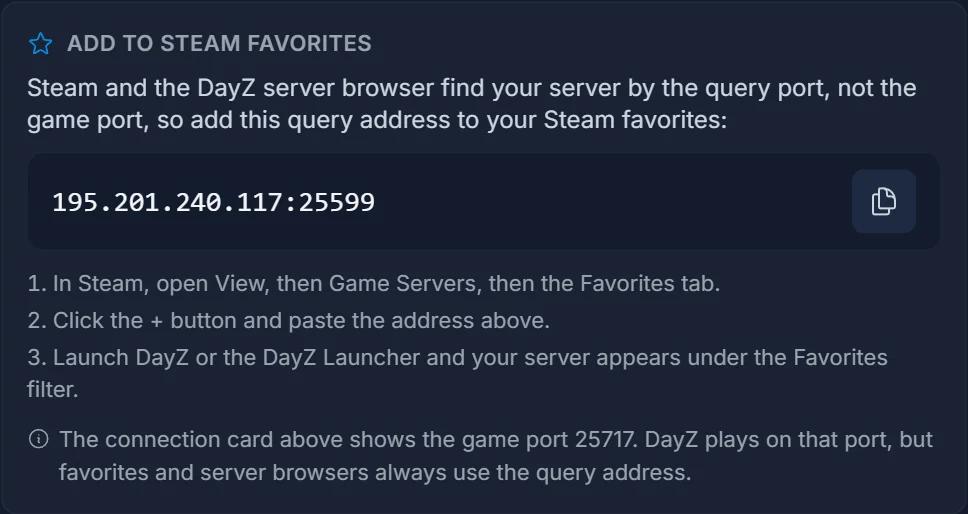
- In Steam, open View, then Game Servers, then the Favorites tab
- Click the + button and paste the query address from your panel
- Launch DayZ, or the DayZ Launcher, and your server appears under the Favorites filter
Once it is favorited, it stays. You will not need to repeat this after a restart, a wipe, or a mod change.
If Steam accepts the address but the entry sits there greyed out, the server is offline. Start it from the panel and give it a minute.
Method 2: The in-game server browser
Fine for finding your server the first time, unreliable as a habit.
- Launch DayZ and choose SERVERS
- Open the COMMUNITY tab
- Type your server name into the name filter
The catch is that DayZ's community list is enormous and the filters are inconsistent. A server that exists will sometimes refuse to appear until you clear every filter, change the sort, and search again. Worse, the browser hides full and password-protected servers under default settings, so your own server can vanish the moment a friend joins.
Use this to confirm the server is listed. Use favorites to actually get in.
Method 3: Direct connect
If your server has no password, you can go straight in from the DayZ Launcher: open the launcher, choose Change Server, and enter the IP and the game port, not the query port. This is the one place the game port is correct.
It is the fastest route and the least forgiving. A single wrong digit fails with a generic timeout that tells you nothing about which digit.
Joining from Xbox or PlayStation
Console DayZ has its own community server list and no mod support at all.
- From the main menu choose SERVERS, then COMMUNITY
- Search for your server by name
- Select it and choose FAVORITE so it stays in your list
Console cannot join by IP. Name search is the only route, which means your server name matters more than it does on PC. Pick something specific. A server called "DayZ Server" is functionally unfindable among the thousands of others.
Mods, and the error everyone hits
If your server runs mods, every player needs the same mods at the same versions. The DayZ Launcher handles this for you: pick the server from your favorites, and the launcher lists the mods you are missing and offers to download them from the Steam Workshop before it launches the game.
Let it finish. A partial download produces the most misread error in DayZ:
You cannot play/edit this content
That message does not mean you lack a licence or that anything is banned. It means your mod list does not match the server's. Something is missing, something is an old version, or something is loaded that the server is not running.
The fix is almost always to launch from the DayZ Launcher rather than from Steam directly. Launching from Steam starts DayZ with no mods loaded, and a modded server will refuse you immediately.
First join
Your character is stored per server, not per account. Joining your own server for the first time gives you a fresh spawn on the coast with nothing, even if you have hundreds of hours elsewhere. That is normal.
From then on, that character persists on that server across restarts and disconnects. Your character does not follow you between servers, so hopping to a friend's server and back leaves your gear exactly where you left it.
Troubleshooting
The server does not appear in the browser or in favorites. You almost certainly added the game port. Go back to the panel and copy the query address from the Add to Steam favorites block instead.
Bad version, server rejected connection. Your game and the server are on different DayZ builds. Updates arrive on a slight delay, so this usually resolves itself. Verify your game files in Steam, and if the mismatch persists, the server needs restarting so it picks up the current version.
You cannot play/edit this content. A mod mismatch. Launch through the DayZ Launcher and let it reconcile the mod list, as above.
Connection timed out or the loading screen never ends. Check the server is actually running in the panel, then check the Console tab. A server still writing its first world files is not accepting players yet, and the first boot after a wipe takes noticeably longer than a normal start.
Kicked by BattlEye immediately. Usually a stale BattlEye install on your side. Reinstall BattlEye from your DayZ install folder, then restart Steam entirely before trying again.
Friends cannot join but you can. You are probably connecting from favorites while they are searching by name with default filters. Send them the query address and have them favorite it.
Frequently asked questions
Which address do I give my players? The query address from the Add to Steam favorites block. It works in Steam favorites and in the DayZ Launcher, which covers almost everyone.
Why is the query port different from the game port at all? The game port carries actual gameplay traffic. The query port answers the small status requests that server browsers use to show the name, player count and ping without connecting you. They are deliberately separate, and DayZ inherits the behaviour from the engine.
Can I change the ports? The allocation is fixed to your server. Changing it is not something you need to do, and the panel keeps both values in step for you.
Do I need to open ports in my router? No. That applies to servers hosted on your own machine at home. Yours runs on our hardware and is reachable from the internet already.
My server name shows the old name after I changed it. Server browsers cache aggressively. Restart the server, then give the browser a few minutes to pick up the new name.
Can console and PC players share a server? No. DayZ keeps the console and PC server lists entirely separate, and there is no crossplay between them.
Still staring at an empty server browser? Contact support with your server name and we will check the query response from our side. Not running a server yet? Take a look at our DayZ server hosting plans.
