
A Garry's Mod server is reached through one line of text: its IP and port, written together as IP:PORT. Paste that into the developer console and you connect at once, or find the server in the multiplayer browser under its gamemode. Both routes end on the same server, so pick whichever suits the player.
Before anyone can join
The server has finished booting. Open the Console tab and look for Connection to Steam servers successful. followed by the public IP. Until then the server answers nothing, and every attempt to join just times out.
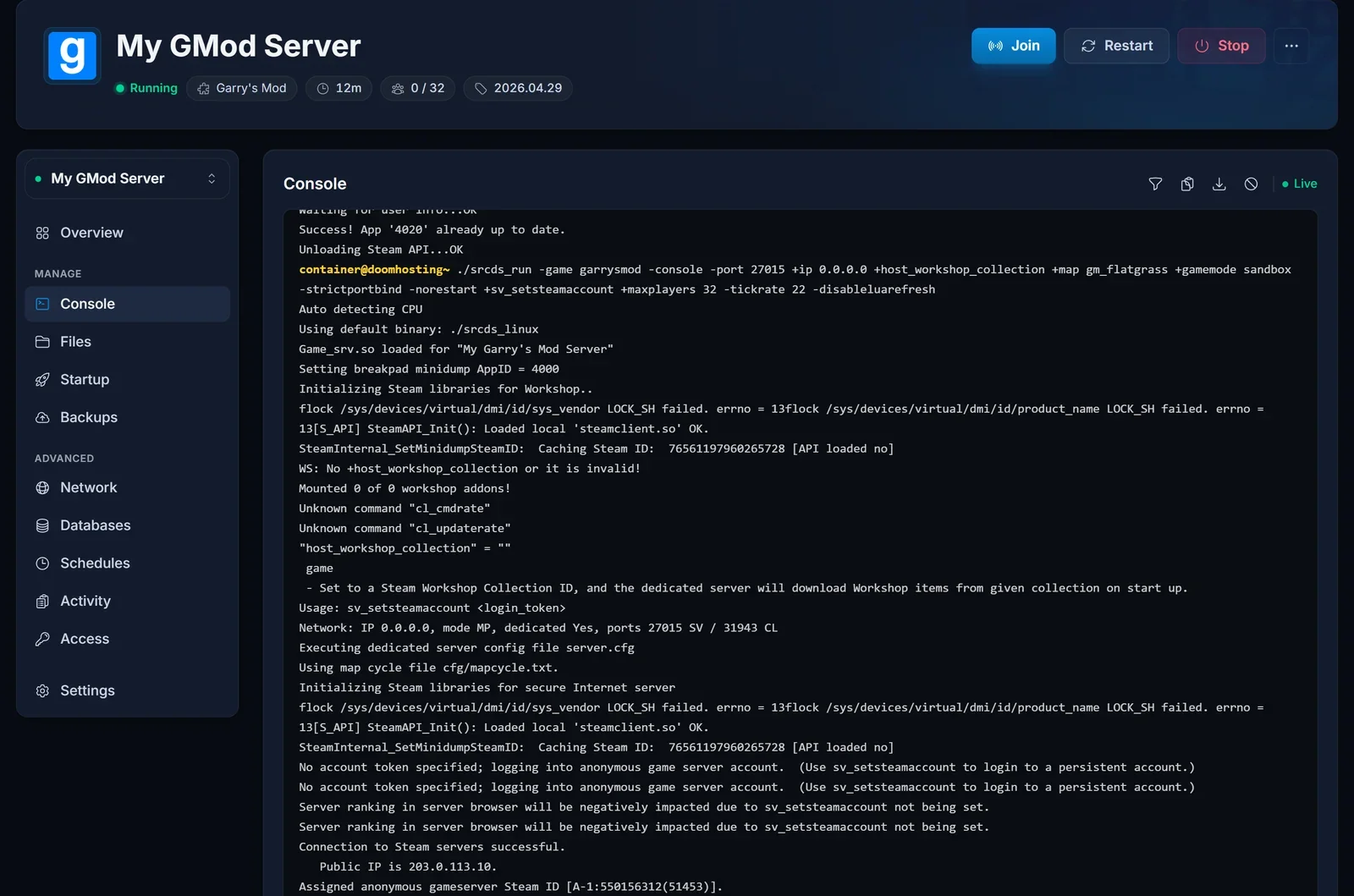
You share the whole address. Several servers can live on the same IP, and the port decides which one a player lands on. Send IP:PORT, never the IP on its own.
Players have the password, if you set one. How that works is covered further down.
Where the address is
Open your server in the control panel. On the Overview tab, the Connection address card shows the address with a copy button next to it. The Join button in the server header opens the same details from any tab.
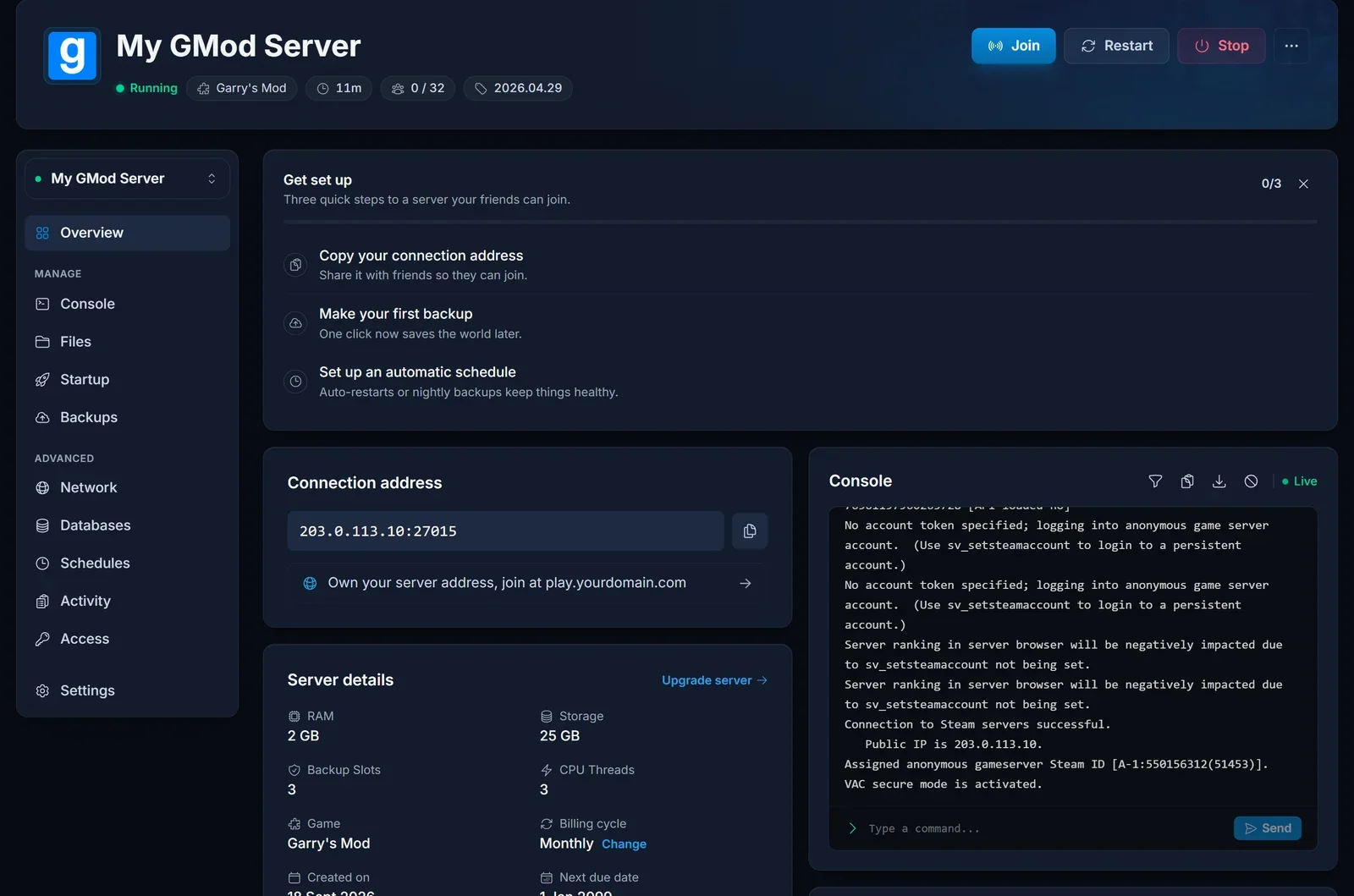
Garry's Mod answers game traffic and server browser queries on the same port, so there is no second number to work out. What the card shows is exactly what players use.
Joining through the console
The quickest route once the address is on your clipboard.
- In Garry's Mod, open Options, go to the Keyboard tab, click Advanced and tick Enable developer console. This is a one-time setting
- Press the key below Escape, usually
~or`, to open the console - Type
connectfollowed by the address and press Enter:
connect 203.0.113.10:27015
When a connection fails, the console prints the real reason. The loading screen rarely does, so this is also the best place to start when something goes wrong.
Joining through the server browser
- Choose Find Multiplayer Game on the main menu
- Under Internet, servers are sorted by gamemode first. Open the gamemode your server runs, such as Sandbox, DarkRP or Trouble in Terrorist Town
- Type part of the server name into the search field to narrow the list
- Select your server and join
History remembers servers you have played on before, and Favorites keeps the ones you have saved, so a regular server is only a click away next time. Legacy Browser opens the older list without the gamemode grouping.
After a restart the public list can need a minute before the server shows up again. The connect command works in the meantime.
Servers with a password
Garry's Mod reads its password from the sv_password line in garrysmod/cfg/server.cfg. You can edit that file in the Files tab, see editing config files. The file is read at startup, so restart the server after a change.
Players set the password in their console before they connect:
password yourpassword
connect 203.0.113.10:27015
Joining from the server browser asks for the password instead.
Why the first join is slow
If the server uses Workshop addons, your game downloads them during the first connection, before you spawn. A big collection can keep you on the loading screen for several minutes. The files stay on your disk afterwards, so later joins are quick.
Troubleshooting
The connection times out. The port is missing or wrong, or the server is stopped. Compare what you typed with the Overview card and check the server state there.
The server is not in the browser. Make sure it has finished booting, then look under the right gamemode or search for the name. A DarkRP server does not appear under Sandbox. Right after a restart, give it a minute, or use connect.
Nothing happens when you press the console key. The developer console is still disabled. Turn it on under Options, Keyboard, Advanced.
The password is refused. Run password before connect, not after. If the owner changed it recently, the server has to restart before the new password counts.
Purple and black checkerboards or red ERROR models. You are on the server, but your game is missing content the map or addons rely on. That is fixed on the server side by sending the content to players, usually through a Workshop collection, so tell the owner.
Frequently asked questions
Is the IP enough? No. Include the port. Without it the game tries the default port, which may belong to a different server or to none at all.
Can friends join if the server is not in the browser?
Yes. The connect command only needs the address and works whether the server is listed or not.
Do players need the same addons installed beforehand? No. Addons the server provides through the Workshop are downloaded automatically when a player connects.
Right address, server running and still no way in? Contact support with your server name and what the console says, and we will look from our side. No server yet? See our Garry's Mod server hosting plans.
