
ARK does one thing backwards, and it costs new server owners an evening. Steam finds ARK servers by their query port, not by the game port your server actually plays on. Hand Steam the address from the connection card and it finds nothing, every time, with no error to explain why. Once you know which number goes where, joining takes about a minute. This guide covers the Steam favorites route with screenshots, what Epic players do instead, and the failures worth recognising.
What you need before you start
- Your server showing as running in the game panel
- Both addresses from your server's Overview page, explained below
- ARK: Survival Evolved installed on Steam or the Epic Games Store
Two numbers, and which is which
Your server has a game port, the one on the Connection address card. That is the port ARK plays on, and it is the one the in-game console command uses.
Steam does not search on it. Steam's server browser and Favorites list ask for a status reply on a separate query port, and nothing is listening for that request on the game port. That is why the address you would naturally copy is the one address that does not work in Steam.
Your panel gives you both. Under the connection card there is an Add to Steam favorites block showing the query address. Copy that one for everything in the next section, and keep the game port handy for the Epic route further down.
Method 1: Add the server to Steam favorites
The route almost everyone should use. It persists, so you do it once.
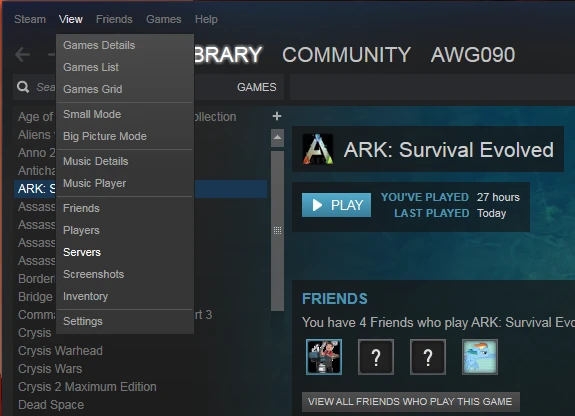
Open Steam, click View in the top menu, and choose Servers.
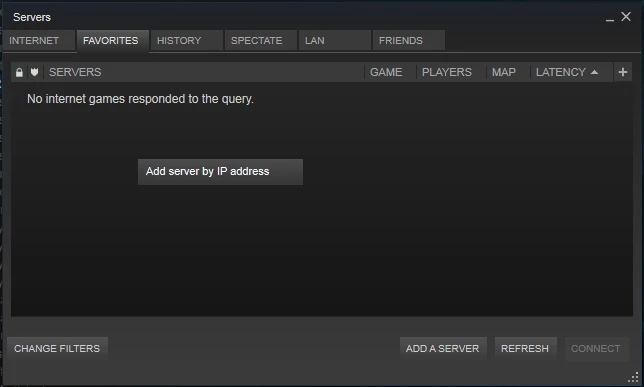
In the window that opens, switch to the Favorites tab and click Add a Server.
Paste the query address from your panel and confirm.
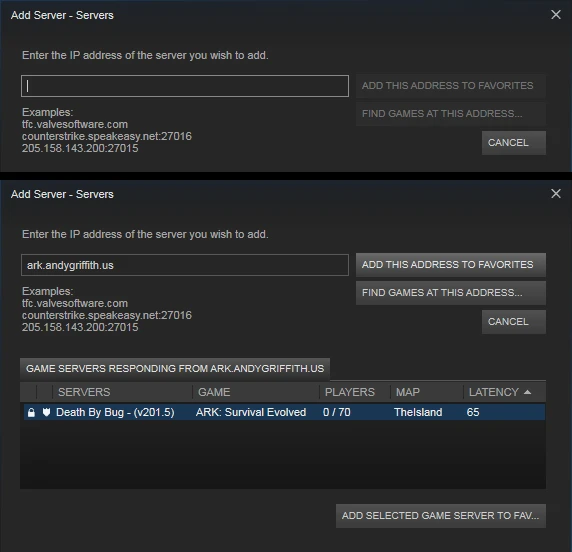
Steam checks the address as you add it. If it comes back with nothing found, you have almost certainly pasted the game port. Go back to the panel and take the address from the Add to Steam favorites block instead.
Now launch ARK, choose Join ARK, and set the Server Filter at the bottom left to Favorites. Your server is in the list.
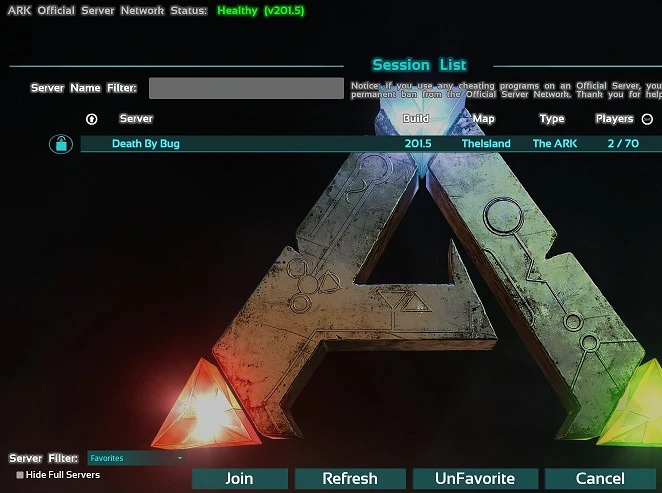
Select it and press Join. If the list looks empty, untick Hide Full Servers and press Refresh.
Method 2: The unofficial server list
Workable, slow, and worth knowing as a fallback.
- Launch ARK and choose Join ARK
- Set Server Filter to Unofficial
- Type your server name into the Server Name Filter box
- Press Refresh and wait
The unofficial list is long and the refresh is not quick. A server that genuinely exists can take several refreshes to appear, and a freshly started server will not be listed until it has finished coming up and registered itself.
Use this to check your server is visible to the world. Use favorites for getting in day to day.
Method 3: Epic players and the console
Epic copies of ARK cannot use Steam favorites, so they connect directly, and this is the one place you want the game port rather than the query port.
- At the main menu press Tab to open the console
- Type
openfollowed by your address and game port, soopen 203.0.113.10:7777 - Press Enter
The screen goes to a loading state and drops you in. There is no confirmation and no error if you mistype, it simply fails to travel, so check the address carefully.
Steam players can use this too, and it is often quicker than the browser when a server has just restarted.
Mods
If your server runs mods, your client downloads them from the Workshop when you join, and ARK handles that without being asked. The download happens before the map loads, so a heavily modded server makes for a long first join and a quick one after that.
Where this goes wrong is a client that already has an older version of a mod cached. ARK is supposed to update it and sometimes does not, leaving you stuck on the loading screen or dropped back to the menu. Unsubscribing from the mod in the Workshop, deleting the leftover mod folder in your ARK install, and rejoining forces a clean download.
First join
You create a new survivor per server, so joining your own server gives you a fresh level one character on the beach even if you have a maxed survivor elsewhere. Your character belongs to that server and stays there between sessions.
Transfers between servers are a separate system that has to be enabled, and they are not something that happens by accident.
Troubleshooting
The server never appears in Steam favorites. The game port went in instead of the query port. This is the cause the overwhelming majority of the time. Re-add it using the address from the Add to Steam favorites block.
Connection timeout. Usually a server that is still starting. ARK takes a while to load a map, and it does not answer queries until it is ready, so check the Console tab in the panel and wait for it to finish.
The server shows in the list but joining kicks me back to the menu. Nearly always mods. Let the Workshop downloads finish, and if it repeats, clear the cached mod as described above.
Blueprint or mod mismatch errors. Your mod versions and the server's disagree. Restart Steam so it picks up pending Workshop updates, then rejoin.
The list is empty with the Favorites filter on. Untick Hide Full Servers, press Refresh, and confirm the server is actually running in the panel.
Friends cannot find it but I can. They are searching the unofficial list rather than using favorites. Send them the query address and have them add it in Steam the same way.
Epic and Steam players cannot see the same server in the browser. Expected. Epic players join with the console command instead, using the game port.
Frequently asked questions
Which address do I give people? The query address for anyone on Steam, and the game port address for anyone on Epic or using the console. Both are on your Overview page.
Why does ARK work this way? The query port answers the small status requests browsers use to display a server's name, map and ping without connecting. ARK exposes that on its own port rather than the play port, which is normal for the engine but catches people out because both numbers are visible.
Can Steam and Epic players share a server? Yes. They just reach it differently, browser versus console command.
Do I need to forward ports? No. Your server runs on our hardware and is already reachable. Port forwarding applies to servers hosted at home.
Can I change my server name? Yes, from the panel. Server browsers cache the old name for a while, so restart the server and give it a few minutes to propagate.
Does my character carry over from single player? No. Single player and server characters are separate. You start fresh on the server.
Still not seeing your server in the list? Contact support with your server name and we will check the query response from our side. Not running a server yet? See our ARK: Survival Evolved server hosting plans.
