
A FiveM Enhanced server runs Cfx.re's server software for GTA V Enhanced, the current PC release of the game. Out of the box it is a clean server with nothing on it, and it will not even boot until it has a license key. This guide gets you from that empty state to a server your players can join: the key, the name and slot count, how you want to manage the config, where your files go, and what to watch for if you are bringing scripts over from a classic FiveM server.
Know the ground rules of early access
Enhanced is still in early access, and a few things are fixed rather than configurable. Read these before you spend an evening migrating:
- Escrowed resources do not load. Cfx.re has not released Asset Escrow for Enhanced yet, so encrypted scripts bought through Tebex stay locked. Anything open source is fine.
- OneSync is permanently enabled, in its big mode, with client-server sync instead of the older peer-to-peer setup.
- Pure mode is permanently enabled, which rules out graphics mods for now.
- There is one gamebuild, the latest. You cannot pin an older one.
- Only Enhanced players can connect. Someone on the classic FiveM client with the older GTA V edition cannot join; see our guide to joining a FiveM Enhanced server.
Step 1: Give the server its license key
Every FiveM server needs a free license key from the Cfx.re portal, and Enhanced uses the same kind of key as classic FiveM. If you do not have one, follow our guide to getting a FiveM license key first.
- Open your server in the game panel and press Start.
- With no key on file, the panel opens a window titled Add your FiveM license key.
- Paste your key. A valid one starts with
cfxk_and is 33 characters in total. - Press Save and start. The key is stored and the server boots straight after.
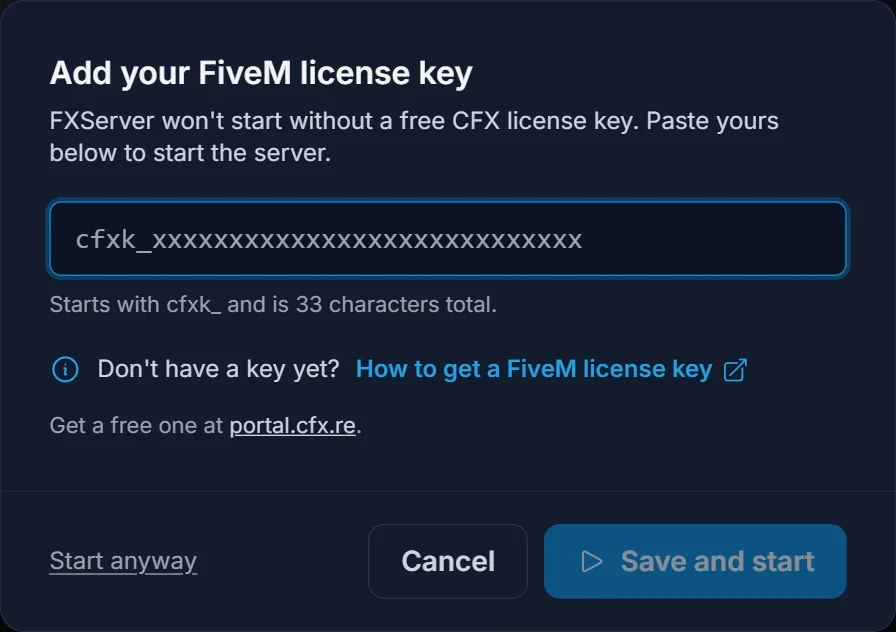
If you regenerate the key later on the portal, paste the new one into the fivem license field on the Startup tab.
Step 2: Set the name, slots and Steam key
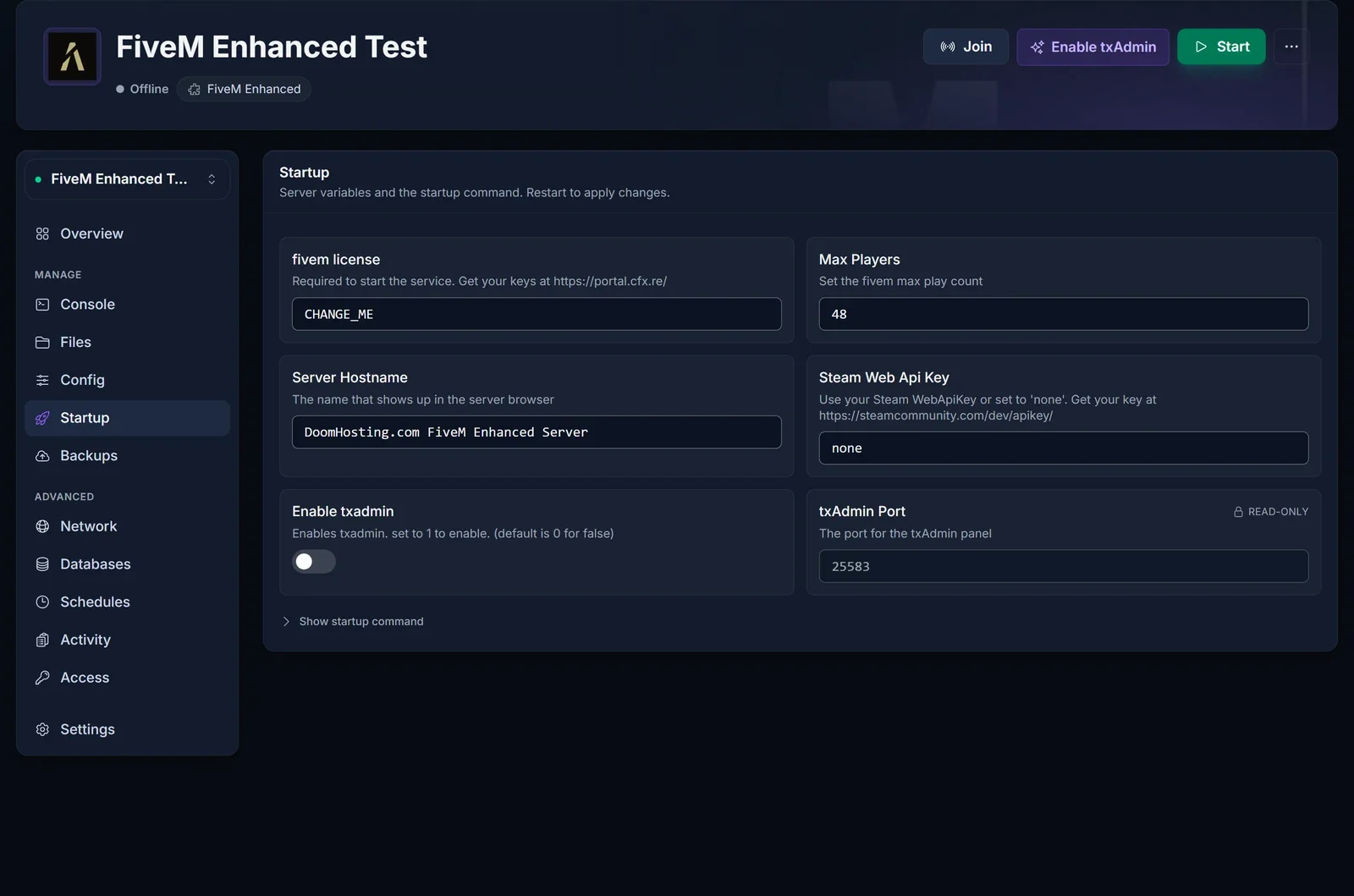
Open the Startup tab. Everything here is read at boot, so restart the server after changing any of it.
- Server Hostname is the name players see in the FiveM server browser. Make it something people can actually search for.
- Max Players sets the number of slots. The default is 48.
- Steam Web Api Key can stay at
none. Only add a key if a resource you run needs to look up Steam profiles. - Enable txadmin switches between the two ways of running the server described in the next step.
- txAdmin Port is filled in for you and cannot be changed. It is the extra port reserved for txAdmin's web page.
Step 3: Choose server.cfg or txAdmin
You can run the server in one of two modes, and it matters which, because they read their settings from different places.
Plain server.cfg (the default). txAdmin is off and the server executes server.cfg on every boot. For simple listing changes you do not even need to open the file: the Config tab offers Locale, Tags, Project name, Project description and Allow ScriptHook as form fields.
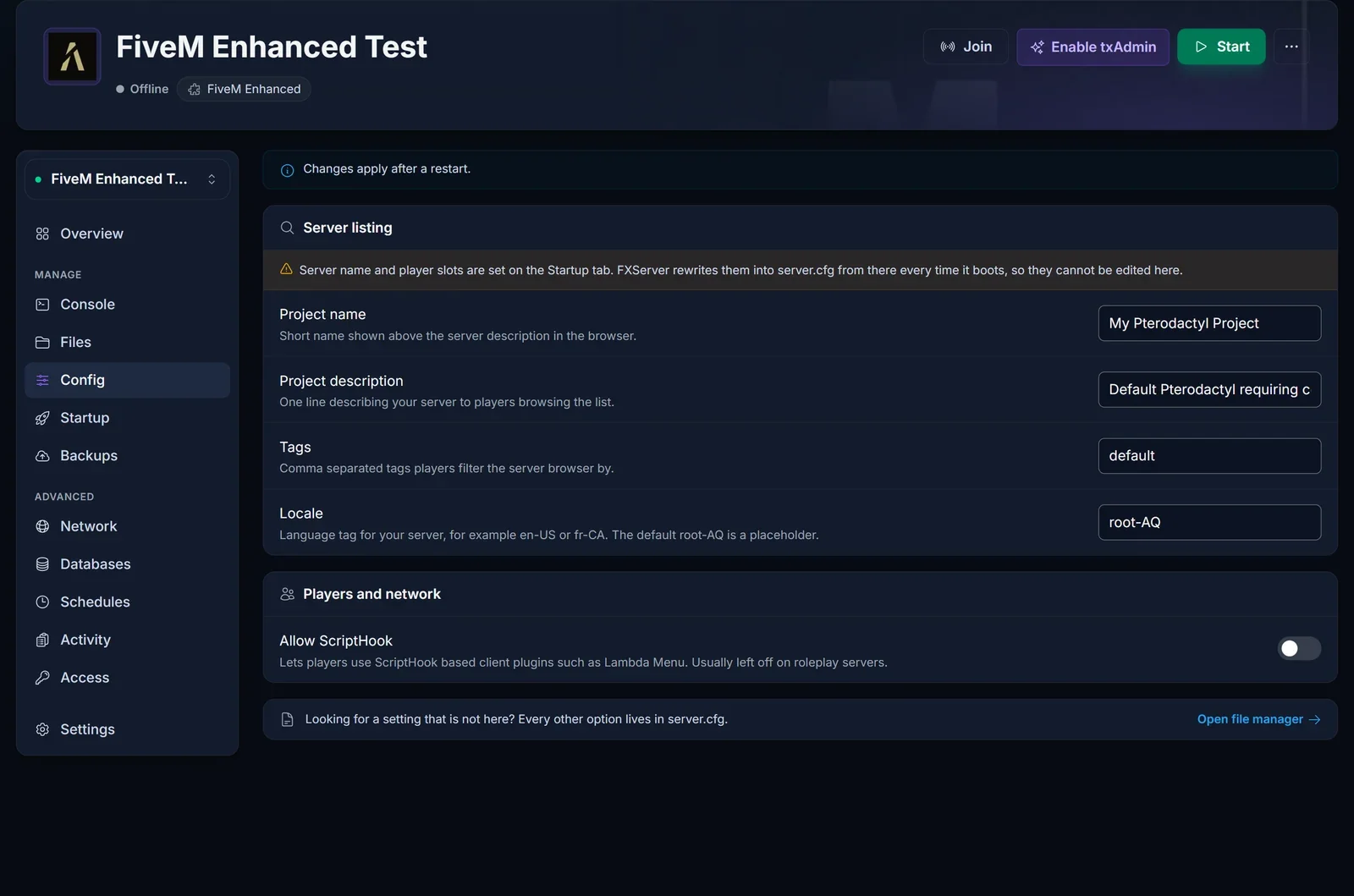
You will notice the server name and slot count are not on the Config tab. They come from the Startup tab and are written into server.cfg each time the server starts, so editing them by hand in the file would be undone at the next boot.
txAdmin. Turn it on with the Enable txAdmin button at the top of the server page, or the matching setting on Startup, then restart. From then on txAdmin is in charge and server.cfg is no longer executed. The first launch asks for a PIN from the console, then lets you set up an admin account, pick a recipe and schedule restarts in the web interface.
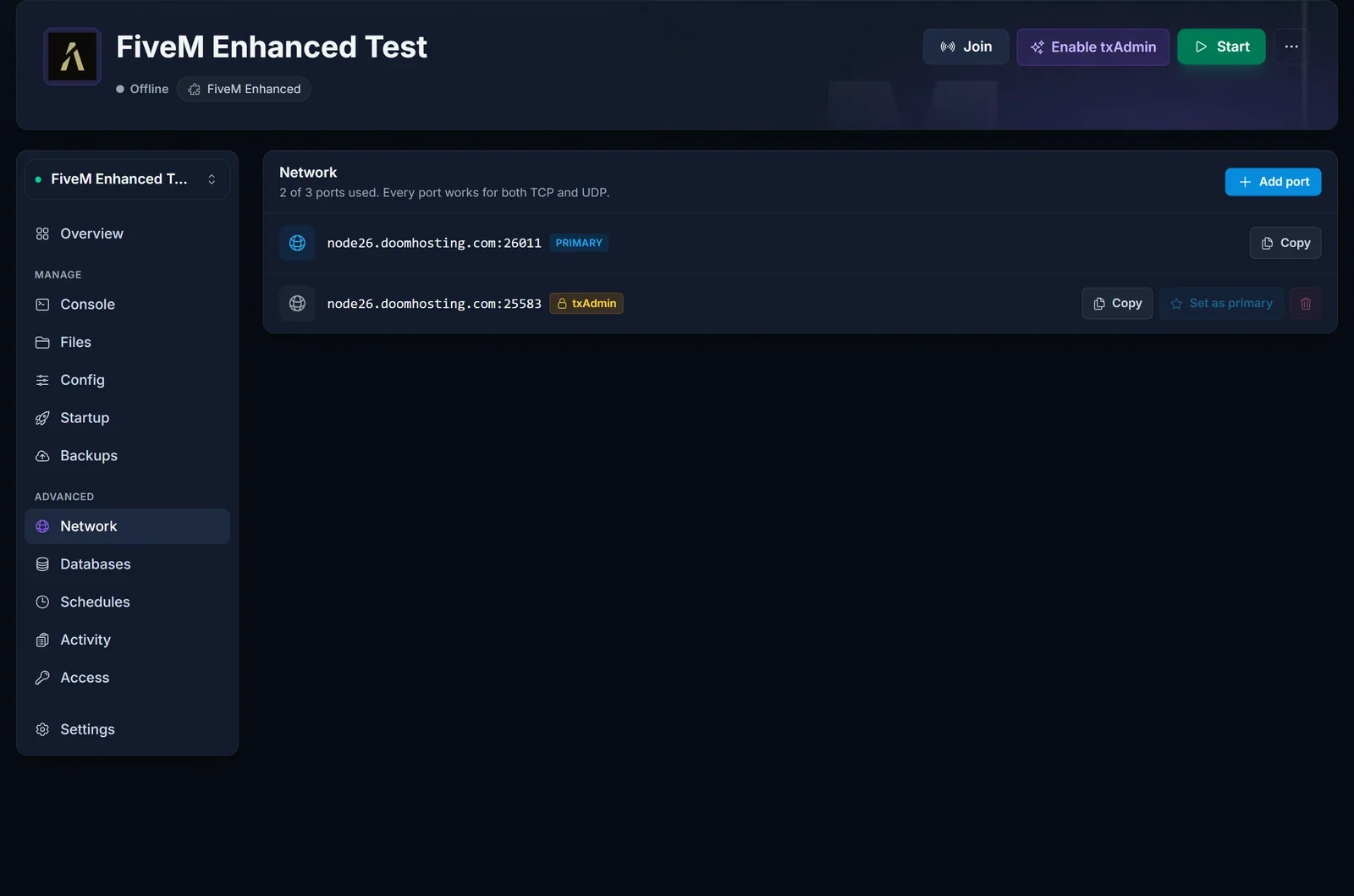
To reach txAdmin you need its port. The Network tab lists two: the main game port for players and a second one tagged txAdmin for the web interface.
Where everything lives
The Files tab opens the server's file manager. At the top level you will find:
server.cfg, the main configuration file for everything the Config tab does not cover.resources, the folder for your scripts, maps and vehicles.alpine, which holds the server runtime itself, including thecfx-serverbinary. On classic FiveM this program is called FXServer. You should not need to touch this folder.
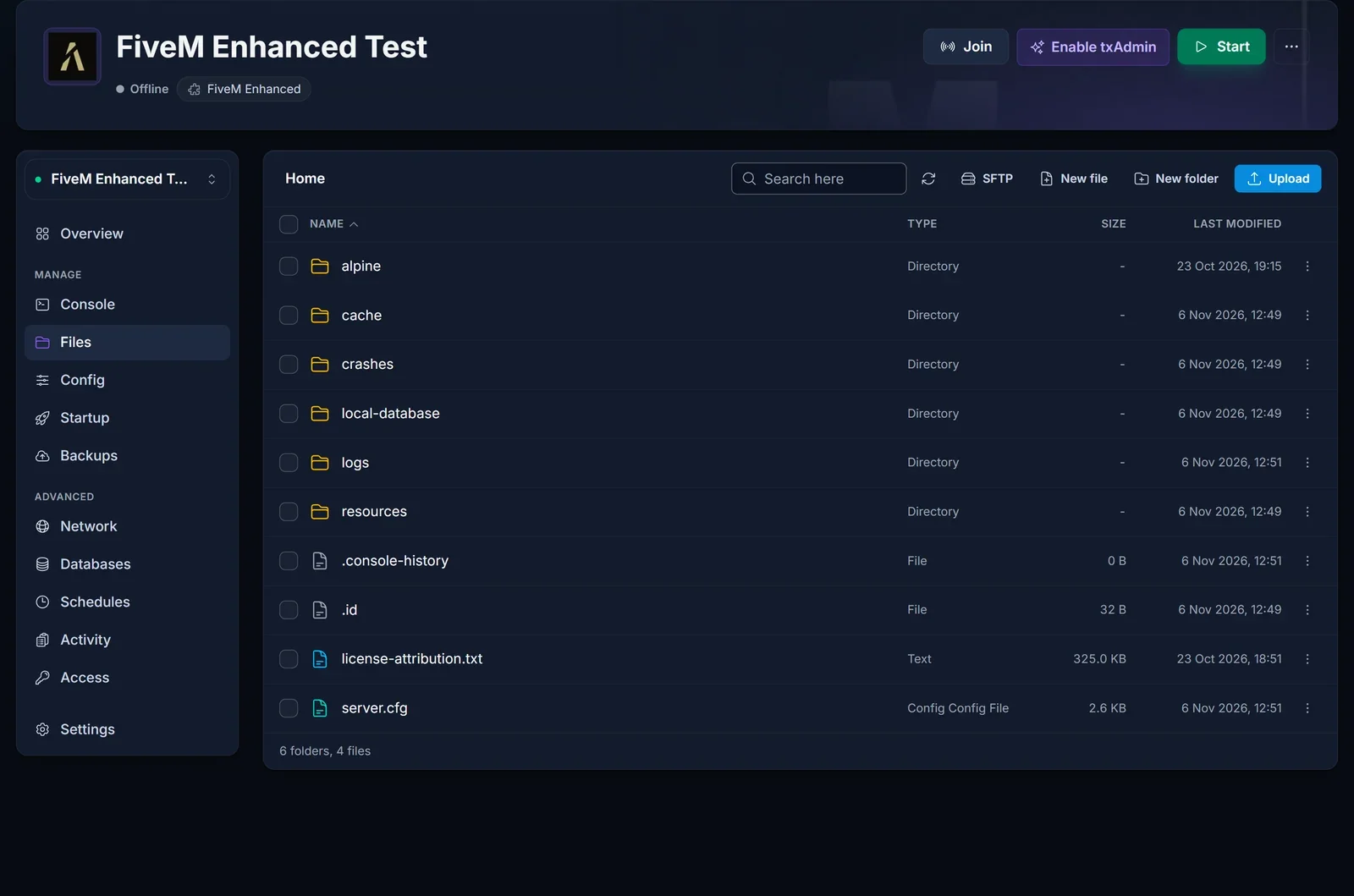
Frameworks and many scripts keep their data in MySQL. You can create a database on the Databases tab and put its details into your framework's connection string, exactly as you would on classic FiveM.
Bringing resources over from classic FiveM
Most open-source resources run on Enhanced without changes. The exceptions tend to be the same handful, so check each of these before you copy a whole server across:
- Streamed content. Custom vehicles, maps and clothing have to go through Cfx.re's Alchemist converter. Put the converted output in a folder named
stream_enhancednext to the existingstreamfolder. Enhanced readsstream_enhancedand ignoresstream, so the same resource keeps working on both builds. - Key-value storage. Data saved through KVP must be moved with kvdb-migrator, or it will look empty.
- Server IDs. Enhanced hands out a player's server ID again after they leave. Scripts that use the ID to recognise a returning player need a different identifier.
- NUI callbacks. These are strict by default now. If a resource's UI stops responding, you can relax it by adding this line to that resource's
fxmanifest.luafile:
nui_callback_strict_mode 'false'
- C# scripts. These now run on .NET 10 rather than Mono. Test them on a quiet server first.
- Endpoint lines. Each
endpoint_add_tcporendpoint_add_udpline takes exactly one endpoint. - Developer mode. Add
sv_devMode truetoserver.cfgif you need it. - No DLC content. To run the base game only, set
sv_enforceGameBuild 1. - Escrowed scripts. As above, they cannot run yet. Ask the author for an open-source version or keep that project on classic FiveM.
Staying on the latest build
Because Cfx.re ships a single current Enhanced build, there is no version list to choose from. To update, take a backup on the Backups tab, then go to Settings and press Reinstall server. Leave the wipe option unticked. The reinstall fetches the newest Enhanced build and leaves server.cfg, your resources folder and txAdmin's data in place.
Problems you might hit
The console says a valid license check is required. The saved key is missing, wrong or no longer valid. Paste it again into fivem license on the Startup tab, check there is no space at either end, and start the server.
sv_endpointprivacy is reported as an unknown command. Enhanced dropped that command. Delete the line from server.cfg and restart.
A paid script refuses to start. It is almost certainly escrowed. Until Asset Escrow arrives on Enhanced, replace it with an open-source alternative.
Changes to server.cfg have no effect. Check whether txAdmin is on. While it is, server.cfg is not executed, so make the change inside txAdmin or switch txAdmin off and restart.
Players load in and then get stuck. Watch the Console tab during a join. A resource with unconverted streamed assets is the usual cause.
Still stuck? Our team is on live chat on the site, or you can open a ticket at support. If you have not ordered yet, the FiveM Enhanced server hosting page has the plans.
