
A fresh Killing Floor 2 server boots straight into a Normal, medium length match on Biotics Lab with a default name. That is fine for a test run, but most groups want their own name, a password, a harder difficulty and maybe some custom maps. Nearly all of it lives on one screen in the game panel, and this guide walks through it in the order you will actually need it.
The first boot takes a while
Press Start on your server in the game panel and open the Console tab. On its first run the server pulls the full dedicated server install from Steam, roughly 32 GB, so expect to wait several minutes. You know it has finished when this line appears in the console:
Playfab server registered with lobby ID
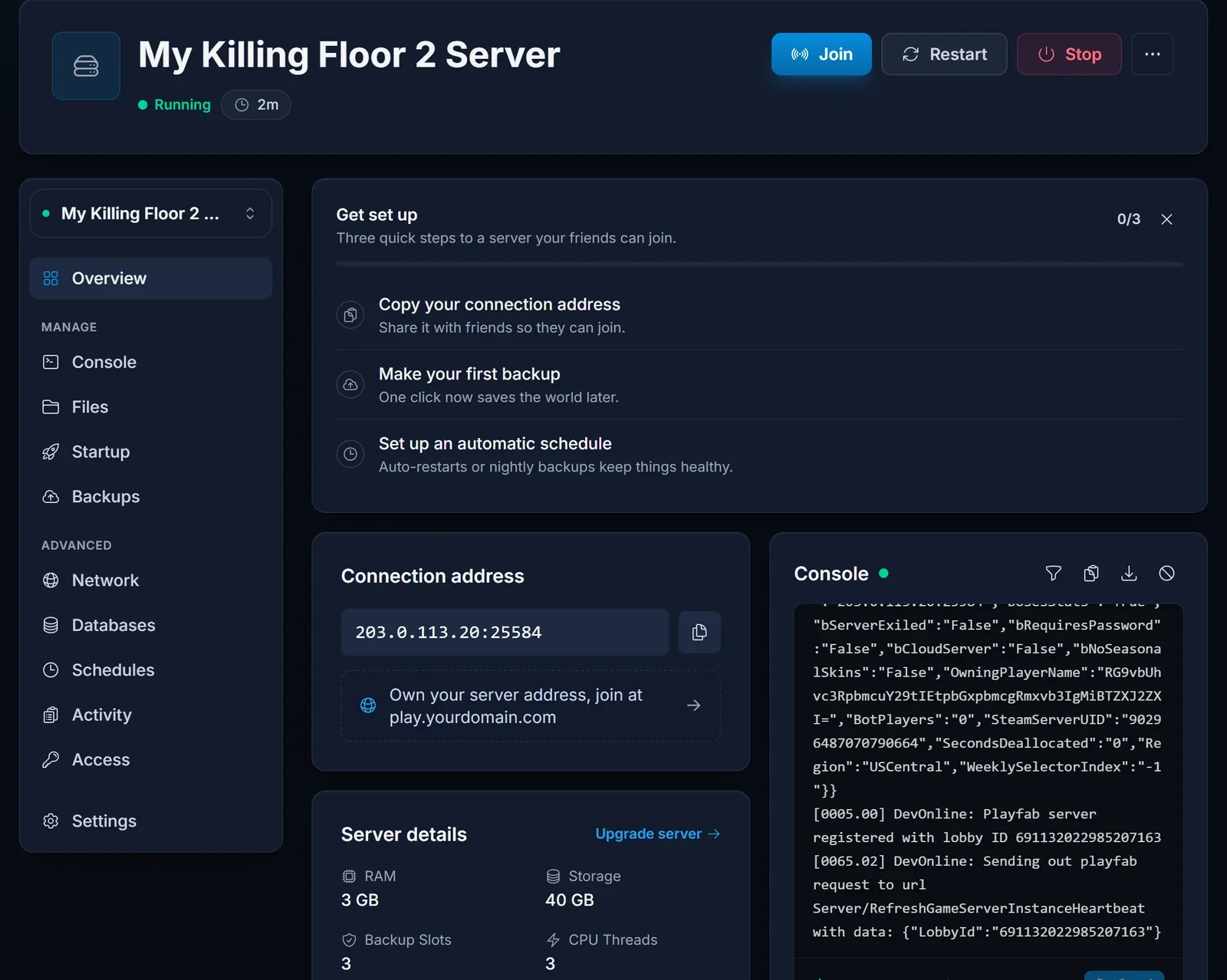
There is one quirk worth knowing early. Killing Floor 2 only creates its config files during that first boot, which means the panel has nothing to write your settings into until it exists. Restart the server once after the first successful start. From then on, the name, passwords and web admin settings are applied every time it starts.
Where the settings live
Every option below is on the Startup tab. Change a value, then restart the server so it takes effect.
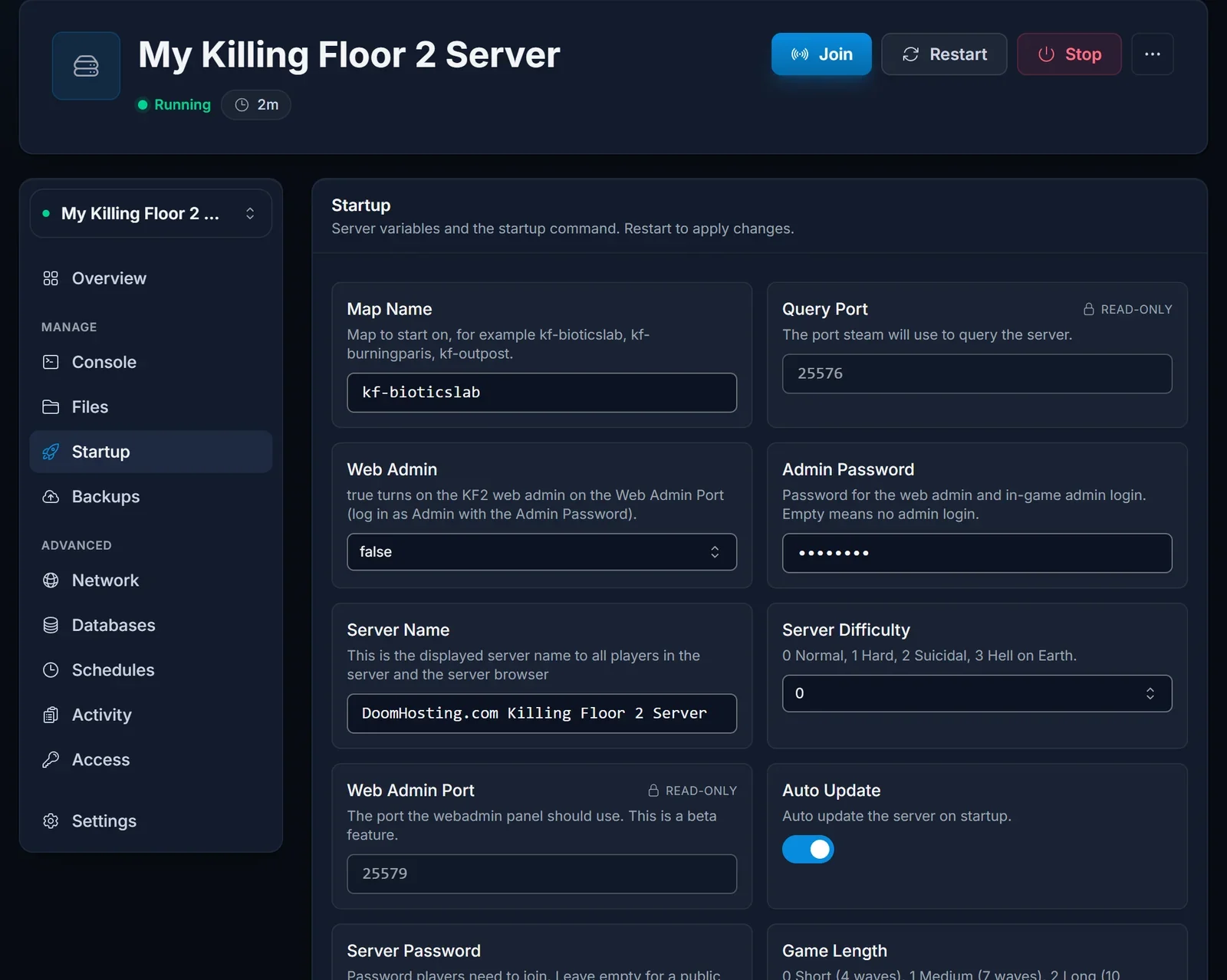
Name and join password
- Server Name is what shows in the server browser. Pick something your group can find by searching.
- Server Password keeps strangers out. Anyone joining then needs it. Leave the field empty for an open server.
The panel writes both values into the game's config each time the server starts. If you edit the same lines in the config file by hand, the panel puts its own values back on the next start, so always change them on the Startup tab.
Difficulty and wave count
Server Difficulty takes a number:
- Normal is
0 - Hard is
1 - Suicidal is
2 - Hell on Earth is
3
Game Length sets how many waves come before the boss:
- Short is
0, with 4 waves - Medium is
1, with 7 waves - Long is
2, with 10 waves
A new group usually has a better time on Normal or Hard with a Short game while everyone learns the perks.
Starting map
Map Name sets the map the server loads on start. Use the map's file name, which is lowercase with a kf- prefix, such as kf-bioticslab, kf-burningparis or kf-outpost.
Player slots
The server holds a team of six, the squad size Killing Floor 2 survival is built for.
Admin access and the web admin
Admin Password is the key to admin rights, both in game and in the browser based web admin. A new server ships with this field empty, and empty means admin login is switched off entirely. Set one before anything else on this list.
The web admin lets you switch maps, kick or ban players and adjust game settings without joining. To turn it on:
- Fill in Admin Password.
- Change Web Admin from
falsetotrue. - Check the port under Web Admin Port.
- Restart the server.
Then browse to http://<server IP>:<Web Admin Port> and sign in with the username Admin and your admin password.
Custom maps from the Steam Workshop
The server can download Workshop maps by itself. Stop the server first, then in the panel's file manager open KFGame/Config/LinuxServer-KFEngine.ini and add the item ID of each map (the number at the end of its Workshop page URL):
[OnlineSubsystemSteamworks.KFWorkshopSteamworks]
ServerSubscribedWorkshopItems=1234567890
ServerSubscribedWorkshopItems=2345678901
In the same file, find the [IpDrv.TcpNetDriver] section and make sure this is the first DownloadManagers line, so players get the maps when they connect:
DownloadManagers=OnlineSubsystemSteamworks.SteamWorkshopDownload
Start the server and the maps download during boot. To start on one, put its map file name in Map Name. To have it appear in map votes, add it to the GameMapCycles list in LinuxServer-KFGame.ini.
How much RAM you need
A standard six-player server with the stock maps is not demanding. Large Workshop maps and mutators raise memory use, so if you add a lot of custom content, keep an eye on memory in the panel and move to a bigger plan if it runs close to the limit.
Quick fixes
Stuck on Starting forever? On a first boot that is the 32 GB download. Follow the Console tab until the Playfab line shows up.
Name or password unchanged after you edited it? Restart once more. Settings land from the second start onward.
Web admin page will not load? Confirm Web Admin is true, an Admin Password is set and the server was restarted, and use the exact port from Web Admin Port.
Need a hand? Use live chat on the site or open a ticket in support.
Next up
Once it is set up, point your players to joining your Killing Floor 2 server. Plans are on the Killing Floor 2 server hosting page.
