
BeamNG.drive has no multiplayer of its own, so every BeamMP session runs through a separate launcher that loads the mod and hands the game an address to connect to. Once each player has that launcher set up, getting onto a hosted server takes under a minute. Below you will find what players should install first, where the server owner gets the address, the two routes into a server, and fixes for the problems people hit most often.
Checklist for every player
- A copy of BeamNG.drive on Steam
- The free BeamMP launcher, downloaded from beammp.com
- The server address from whoever runs the server
Always open the game by starting the BeamMP launcher. If you start BeamNG.drive from your Steam library instead, the multiplayer menu will not be there.
Owners: copy the address from the panel
Open your server in the game panel and stay on the Overview page. The connection card shows the address, and the copy button beside it puts the whole thing on your clipboard, ready to paste into Discord or a group chat.
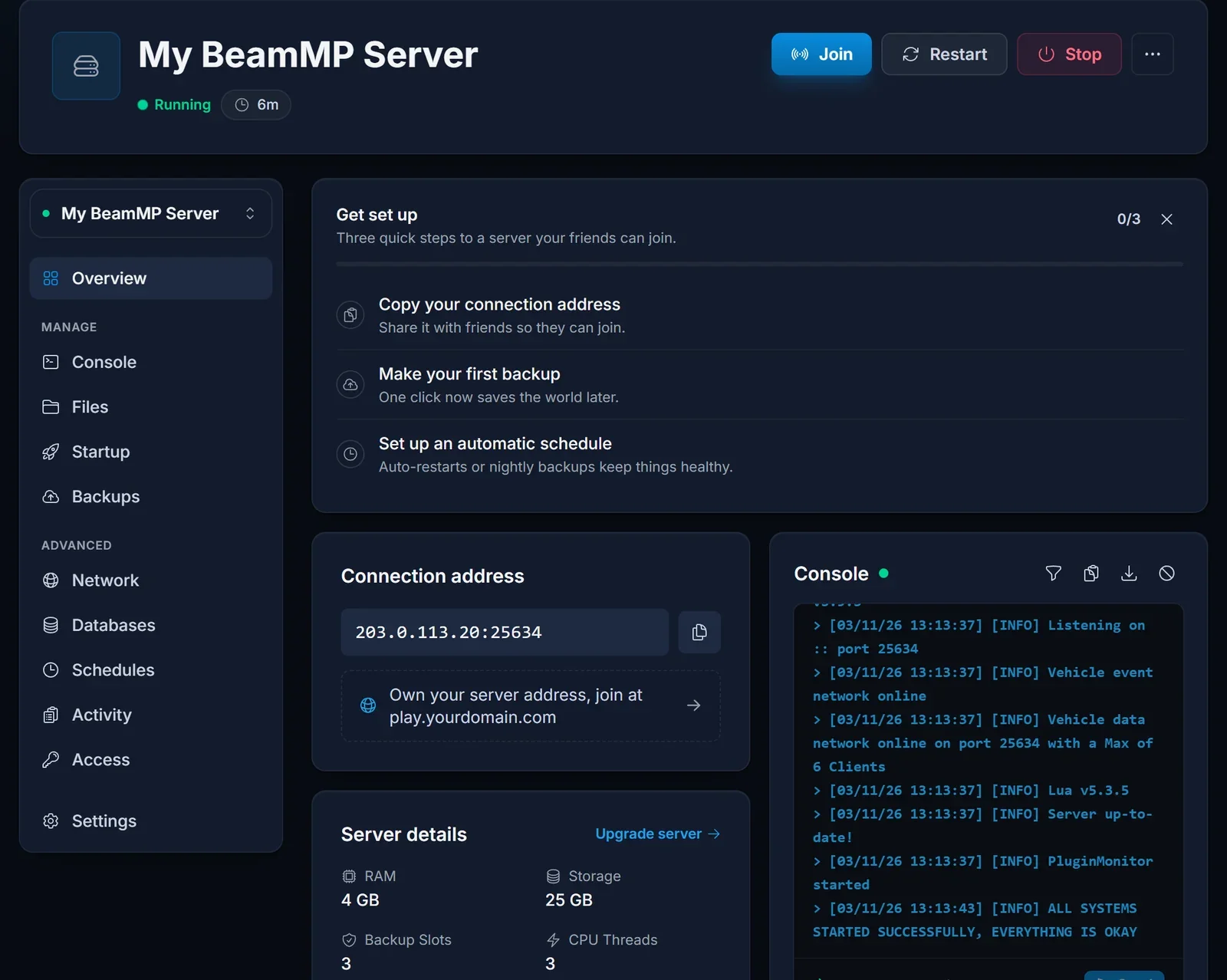
The address has two halves split by a colon. In 203.0.113.20:25634 the IP is 203.0.113.20 and the port is 25634. Players need both halves, so always share the full address rather than the IP alone.
Route 1: connect by IP
This route works whether the server is listed or not, and it is the only option while a server is private.
- Run the BeamMP launcher and wait for BeamNG.drive to finish loading.
- In the main menu, pick Multiplayer.
- Click Direct Connect.
- Put the IP in the IP field and the port in the port field. Do not paste the combined address into a single box.
- Press connect. If the server runs any mods, the game fetches them first, and you spawn once the download completes.
The first visit to a heavily modded server can take a while because of that download. Later visits reuse the files you already have.
Route 2: pick it from the public list
A server only appears in the public BeamMP list after its owner has added an Authentication Key and switched Private off. When that is done, open Multiplayer, type part of the server name into the search box and join from there.
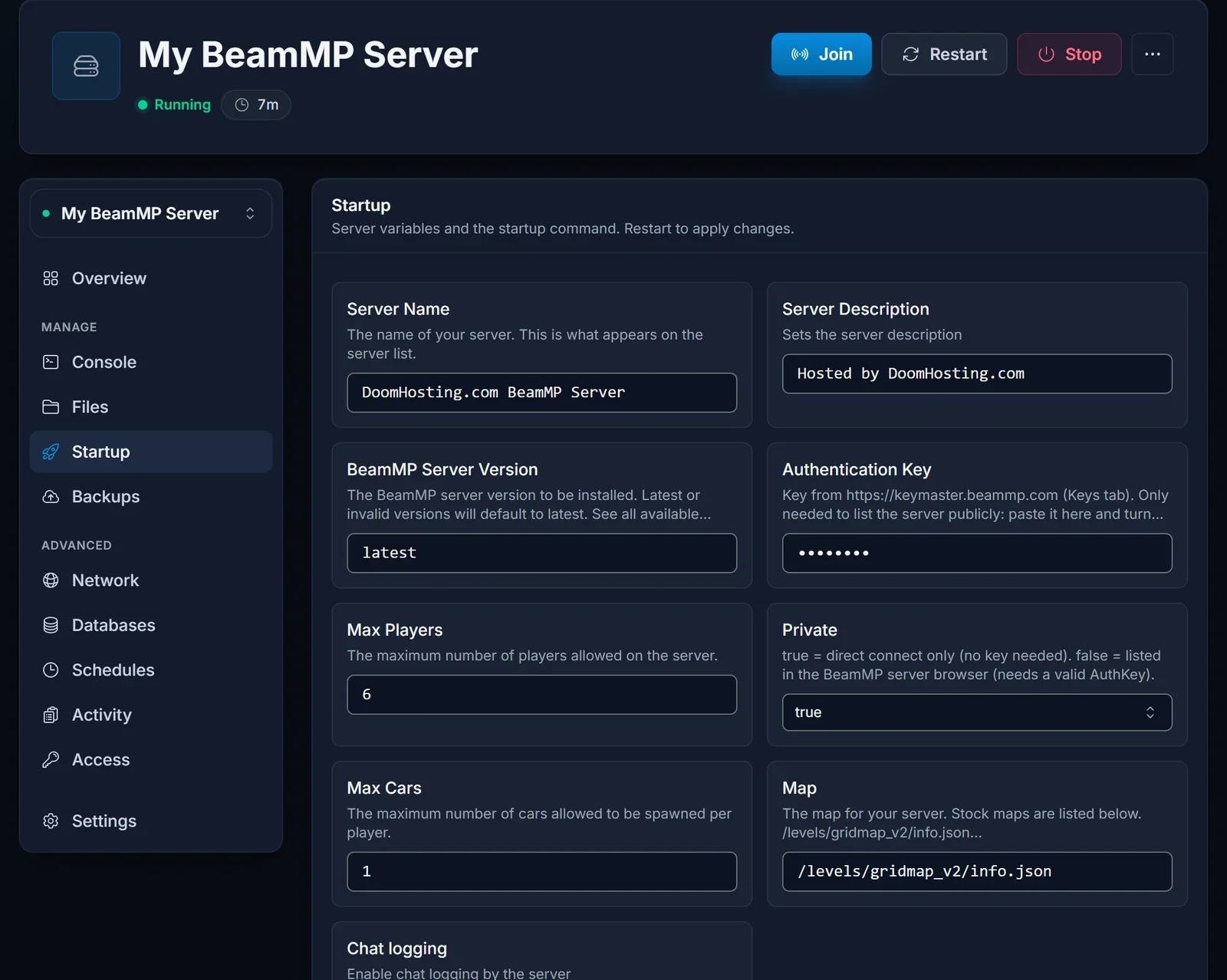
Owners who want to go public will find the key and the rest of the Startup settings explained in getting started with your BeamMP server.
Troubleshooting
"I searched and the server is nowhere." New servers are private by default, so they never show up in the list. Connect by IP, or have the owner add a key and set Private to false.
"The connection times out." Compare the port you typed with the one on the connection card, digit by digit. Then ask the owner to confirm the Overview page says Running. A stopped or restarting server cannot accept anyone.
"It tells me the server is full." The Max Players value sets the limit. Whoever runs the server can increase that number in the Startup settings, and it takes effect after a restart.
"My game or launcher is outdated." Update BeamNG.drive through Steam and let the BeamMP launcher update itself, then try again. If the server itself is behind, the owner can reinstall it from the panel to pull the latest BeamMP server build.
Still stuck? Reach us through live chat on the site or open a ticket at /panel/support.
Related
To rent a server for your own group, see BeamMP server hosting.
