
On Xbox, PlayStation 5 and Nintendo Switch 2, there is one way onto a Valheim dedicated server: the crossplay join code. Consoles cannot run a server themselves, so a group with console players needs a server that runs somewhere else, and a rented one stays up whether or not anyone is online. This guide is about the console side. Steam players, the IP route and Steam favourites are covered in joining your Valheim server.
What console players can and cannot do
They can:
- Join a dedicated server from Xbox One, Xbox Series X|S, PlayStation 5 and Nintendo Switch 2. Valheim 1.0 launched on 9 September 2026 with crossplay across all of these and PC
- Play in the same world as friends on Steam and Game Pass
- Be made admin on the server, see further down
They cannot:
- Host a dedicated server. The server software runs on Windows and Linux machines, not on a console
- Join a server with crossplay turned off. Without crossplay there is no join code, and no other route exists for a console
- Take their character to another platform. The only exception is Xbox and the Microsoft Store version on PC, which share saves. Your progress in the world itself lives on the server, not on the console
Before a console player can join
Crossplay is on at the server. It is on by default on our Valheim servers, so there is normally nothing to do. The connection card shows an ON badge next to the code. If someone switched crossplay off, see turning off crossplay for how the switch works, turn it back on and restart.
Crossplay is on in the game. Valheim also has a crossplay setting on the player's own console. If a player cannot find it, the parental controls on their account may be hiding it.
You have today's code. Valheim creates a new join code every time the server starts. A code from before the last restart is dead, not broken. Copy the current one from the panel every time you share it.
Where the code is
Open your server in the control panel. On the Overview tab, the Connection address card holds everything a console player needs:
- The join code, a number shown in the Crossplay block with a copy button
- The ON badge, so you can see at a glance that console players can reach the server
- The server password, behind a reveal button
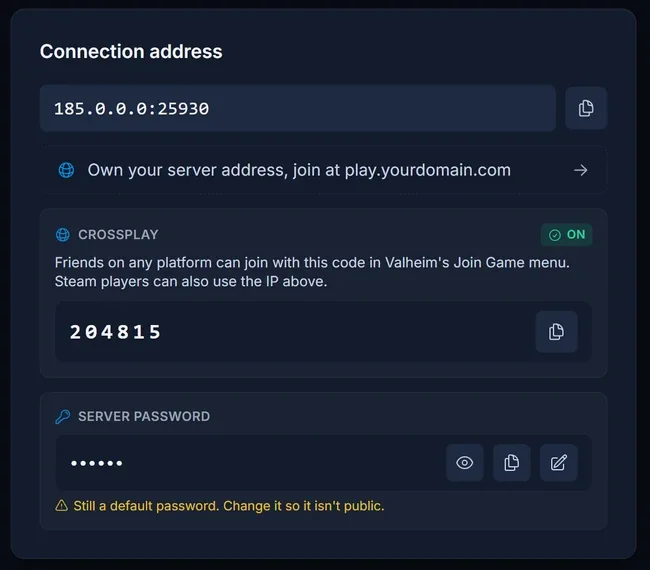
The Join button in the server header opens the same card from any tab, which is the fastest way to grab the code after a restart.
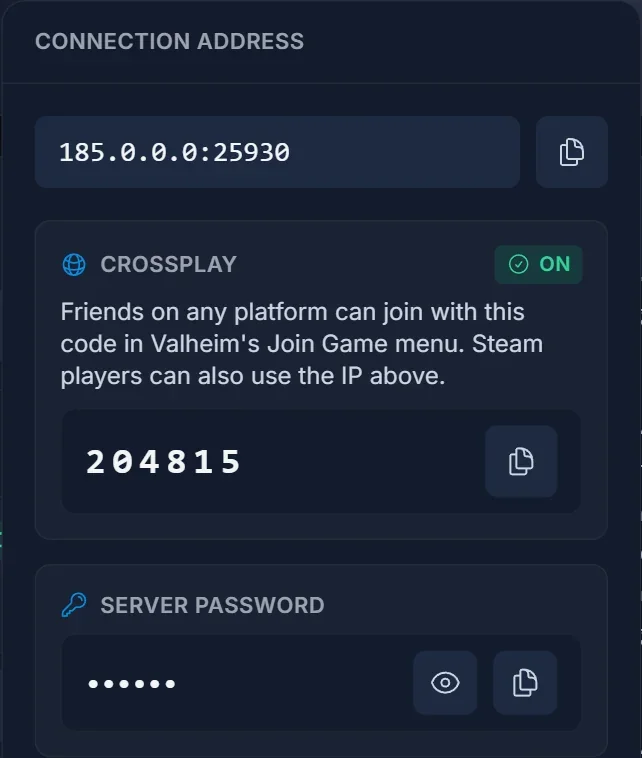
If the block says it is waiting, the server has not finished starting. The code appears a few seconds after the boot completes.
Joining on Xbox, PS5 and Switch 2
The steps are the same on every console.
- Get the current join code from whoever runs the server
- Start Valheim and pick or create a character
- Choose Join Game
- Select Add server
- Enter the join code with the on-screen keyboard and confirm
- Enter the server password when Valheim asks for it
The server stays in your list afterwards. The saved entry is tied to that code, though, so after the next restart remove it and add the server again with the new one.
Game Pass players on PC run the same Microsoft Store build as Xbox, so they should use the join code too.
The password
Valheim asks every player for the server password while connecting, console players included. It is the one on the connection card, not the join code and not the password for your account with us. The rules for choosing a new one are in the PC guide.
Making a console player admin
A console player has no SteamID, so their admin entry uses their Platform User ID instead. The player opens the F2 panel in Valheim and reads the ID, which starts with the platform name, for example Xbox_. Paste that whole ID into the Admins list in the Player Manager tab of the panel.
Troubleshooting
The code a friend sent does not work. The server restarted and the code changed. Copy the current one from the panel and send it again.
The server vanished from the saved list. Same cause. The saved entry points at an expired code. Remove it and add the server again with the current code.
The card shows crossplay OFF. No code exists in that state, and no console can connect. Turn crossplay back on in the Crossplay card on the Overview tab and restart the server.
Valheim says "Failed to connect". Several causes hide behind that message. Work through fixing Failed to connect in Valheim.
The password is refused. Check that the player typed the server password from the card, not the join code.
Only one person cannot get in. Check the crossplay setting on that player's console and their parental controls before you change anything on the server.
Frequently asked questions
Can I run a Valheim server on my Xbox, PS5 or Switch 2? No. Consoles can join a dedicated server but cannot host one.
Do console players need port forwarding? No. The server runs in our datacentre with its ports already open. Router settings only matter when someone hosts from home.
Does the join code stay the same? No. It changes on every server start, which is behind most console connection problems.
How many players can join? Ten, mixed across all platforms. That is Valheim's own limit.
Crossplay on, code fresh and a console player still cannot get in? Contact support with your server name and the exact message the game shows, and we will look from our side. No server yet? Our Valheim server hosting ships with crossplay on, so the join code is ready from the first boot.
