
Enshrouded doesn't ship with mod support for servers. Keen Games offers no Workshop and no official loader, so the panel has no Mods tab for it. What the community uses instead is EML (Enshrouded Mod Loader): a small open source DLL that patches the game's data when the server boots. This guide sets it up from the panel in about ten minutes.
Good to know first: EML is a community project, not something we or Keen Games maintain. After a big game update a mod can stop working until its author updates it, and we can't repair third-party mods. Make a backup in the Backups tab before you begin.
What you can and can't do with EML
EML reads every mod in a mods folder at startup and rewrites values in the game data before the world loads. That covers the classic tweaks: bigger stacks, cheaper crafting, more loot, more stamina and so on.
It can't add anything that runs while you play, such as new commands or scripts. If a mod promises that, it's either client-side or not an EML mod.
Grab these two things on your PC first:
- The loader:
dbghelp.dllfrom the newest release at https://github.com/Brabb3l/kfc-parser/releases - Your mods: Nexus Mods has the biggest collection: https://www.nexusmods.com/enshrouded. Check that the mod page mentions EML and the current game version. A mod is a folder that contains a
mod.jsonfile.
1. Put EML and your mods on the server
Stop the server first, then open the Files tab. The folder you land in is the server root, where enshrouded_server.exe lives.
- Upload
dbghelp.dllstraight into this root folder. - Create a new folder in the root called
mods. - Open
modsand use Upload folder to add each mod's folder.
When you're done, the structure should be:
enshrouded_server.exe
dbghelp.dll
mods/
  my-mod/
    mod.json
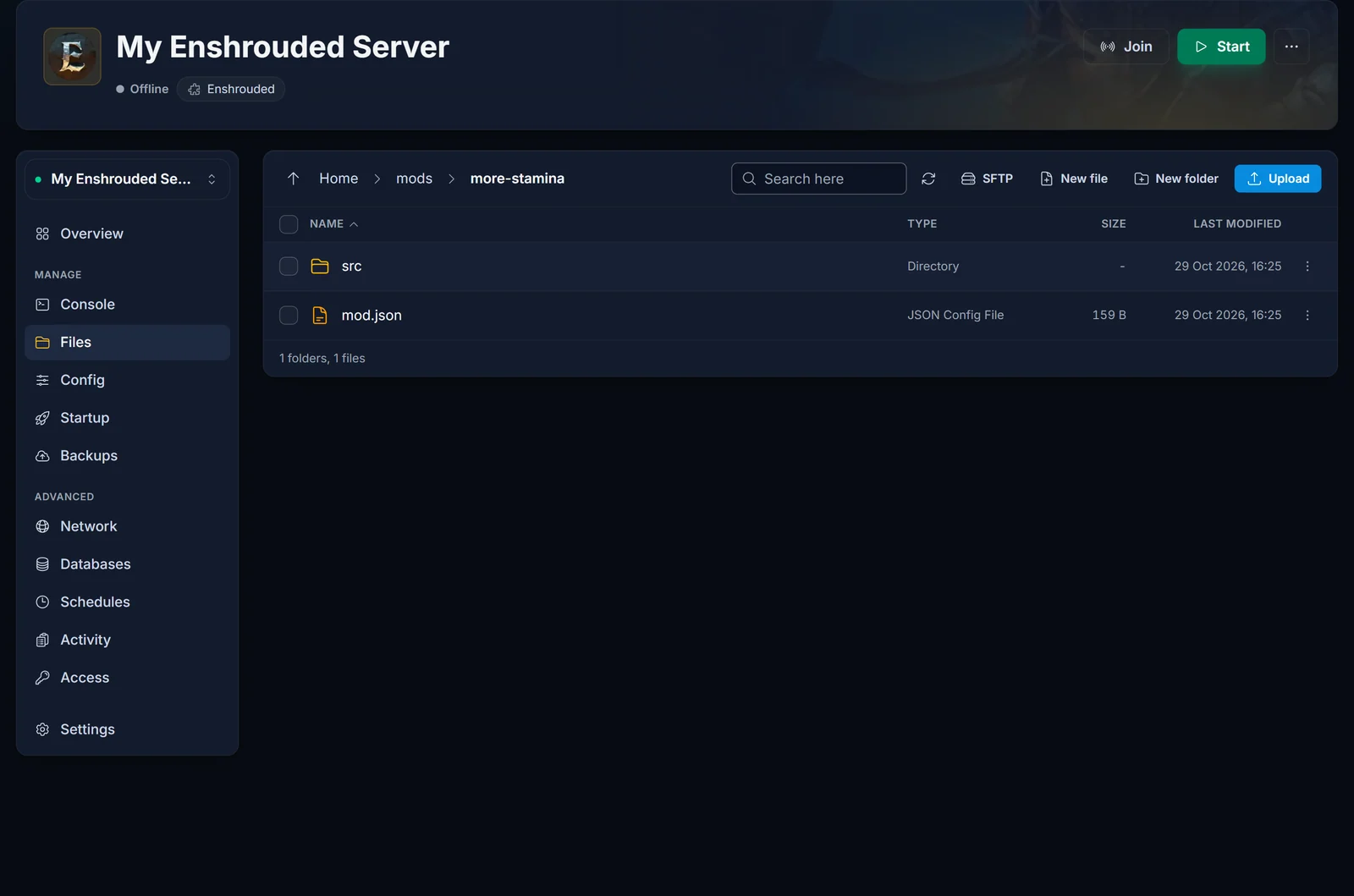
The most common mistake is one folder too many: mods/my-mod/my-mod/mod.json won't load. If a zip unpacks with an extra layer, upload the inner folder. Got a lot of mods? SFTP is faster (the SFTP button in the Files tab).
2. Tell Proton to use the EML DLL
The Enshrouded server is a Windows program, and on our machines it runs through Proton. By default Proton prefers its own copy of dbghelp.dll, so your uploaded one is skipped. One override in Proton's registry file fixes that.
With the server still stopped, go to Steam/steamapps/compatdata/2278520/pfx in the Files tab.
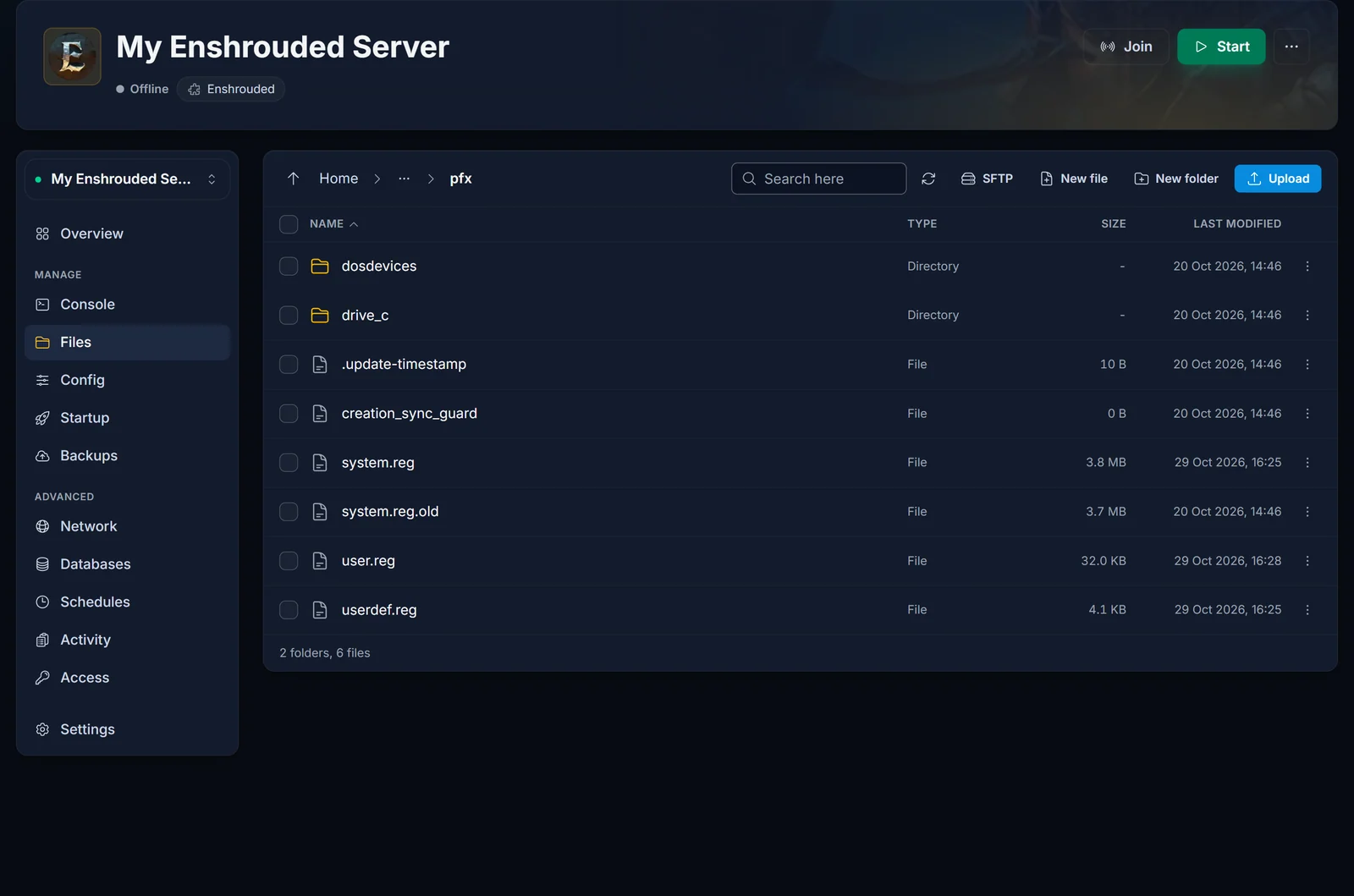
Open user.reg in the panel's editor, scroll all the way to the bottom, leave one blank line and paste this in. Copy it exactly, the double backslashes belong there:
[Software\\Wine\\AppDefaults\\enshrouded_server.exe\\DllOverrides]
"dbghelp"="native,builtin"
Save the file. If the editor won't open user.reg for you, download it, edit it in a plain text editor such as Notepad++ or VS Code, and upload it back to the same folder. On Windows, never double-click a .reg file: that imports it into your own PC's registry.
Two things to watch:
- The server has to be stopped while you edit. A running server writes this file again when it shuts down, and your lines disappear.
- No
pfxfolder? It's created on the first boot. Start the server once, wait until it's online, stop it and look again.
3. Start the server and confirm the mods are active
Start the server and go back to the root folder in Files. If EML ran, two new files have appeared there: eml.json and enshrouded_server.kfc.bak, which is a backup of the untouched game data.
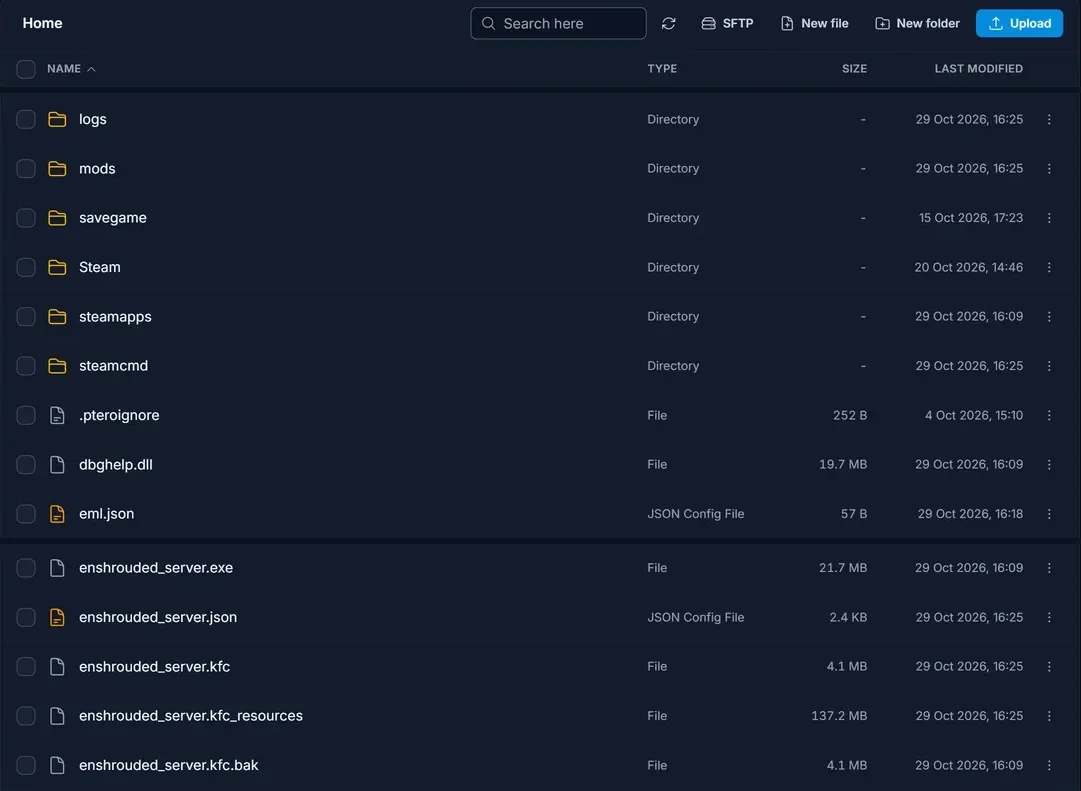
For the details, look in the logs folder, not the Console: EML logs to its own file ending in .eml.log. On a boot with new or changed mods you'll see a Running mod line for each one, followed by Applied ... patches.
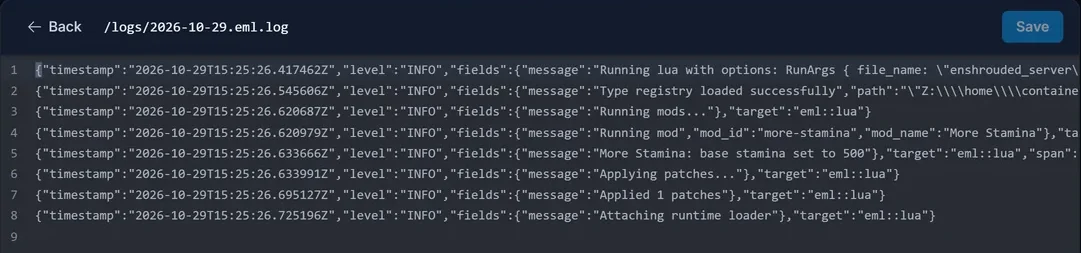
If nothing changed since the last boot, the log only says No changes detected, skipping patching. That's expected, the patched data is still in place.
Everyone who joins now plays with the mods. A few mods need a copy on each player's PC as well, which the mod page will tell you.
Updating or removing mods later
- Add, update or remove a single mod: stop the server, change the contents of
mods, start again. EML spots the difference and patches again. - Go back to vanilla: stop the server, delete
dbghelp.dlland themodsfolder, deleteenshrouded_server.kfcand renameenshrouded_server.kfc.bakback toenshrouded_server.kfc. For a completely clean install, switch on Validate under Startup for a single boot and switch it off again afterwards. The lines inuser.regare harmless without the DLL, so they can stay. - Stack size mods: split oversized stacks before you remove one. Anything above the normal stack limit can vanish.
None of this touches your world. Saves live in the savegame folder, and EML only changes the game's data files.
Troubleshooting
No eml.json and no .eml.log after a restart. The DLL was never loaded. Compare your user.reg lines with the block above (two backslashes between each part, straight quotes), make sure you saved it while the server was stopped, and check that dbghelp.dll is in the root next to enshrouded_server.exe.
The log shows Running mods but no Running mod lines. EML started but found no mods. Each mod.json must sit directly in mods/<mod name>/.
The server won't boot after an Enshrouded update. EML or one of your mods isn't compatible yet. Delete dbghelp.dll and start the server to get back online. When a new EML release supports the update, put it back and re-add your mods one by one so you can see which one breaks.
A mod loads but nothing changes in game. It's probably built for an older game version, or it only changes something client-side. The mod page usually lists what it supports.
Mods are gone after a backup restore. A restore can recreate the Proton folder, which drops your user.reg override. Do step 2 again.
Prefer to skip mods?
A lot of what people mod is already a server setting: difficulty, enemy strength, loot, hunger, durability and the day and night cycle. Settings survive every update. See Enshrouded Server Settings and Configuration. Moving a world you started at home? Follow How to Upload Your Enshrouded World to Your Server.
Need a server? Have a look at our Enshrouded server hosting.
