
If Valheim tells you "Failed to connect" while your friends are already playing on the server, the problem is very likely a small file on your own PC, not the server. Valheim saved a PlayFab crossplay account there the first time you ever joined a server with a join code, and it keeps reaching for it. One button in the game's Settings clears it. This guide explains why the account exists, when to press the button, and the one mistake that makes the fix not stick.
Why Valheim stores a PlayFab account at all
Crossplay in Valheim runs through PlayFab, Microsoft's relay service. It is what lets Steam, Xbox, Game Pass, PlayStation 5 and Nintendo Switch 2 players share one server, and it is where join codes come from. To talk to the relay, your game needs an identity on it. So the very first time you join any server with a join code, Valheim quietly creates a PlayFab account and saves it on your PC.
From then on, that stored account is the first thing the game reaches for when you connect to a dedicated server. That is fine as long as the server still runs crossplay. It stops being fine the moment the server owner turns crossplay off, because there is no longer a relay on the server's side for your client to land on. The game tries the crossplay route, finds nothing there, and reports "Failed to connect". The server is up, players without a stored account get in, and you are locked out by a login you never knew you had.
Signs this is your problem
- The error appears instantly, without the game hanging or timing out
- Other players on the same server connect normally, often the ones who have only ever used Join IP
- The server recently switched from a join code to Join IP, or the owner just turned crossplay off
- You have joined some other Valheim server with a join code at some point, even months ago
With crossplay still on, the same reset is also the first thing to try when PlayFab's own service is having a bad day and the join code fails for everyone.
Clearing the stored account
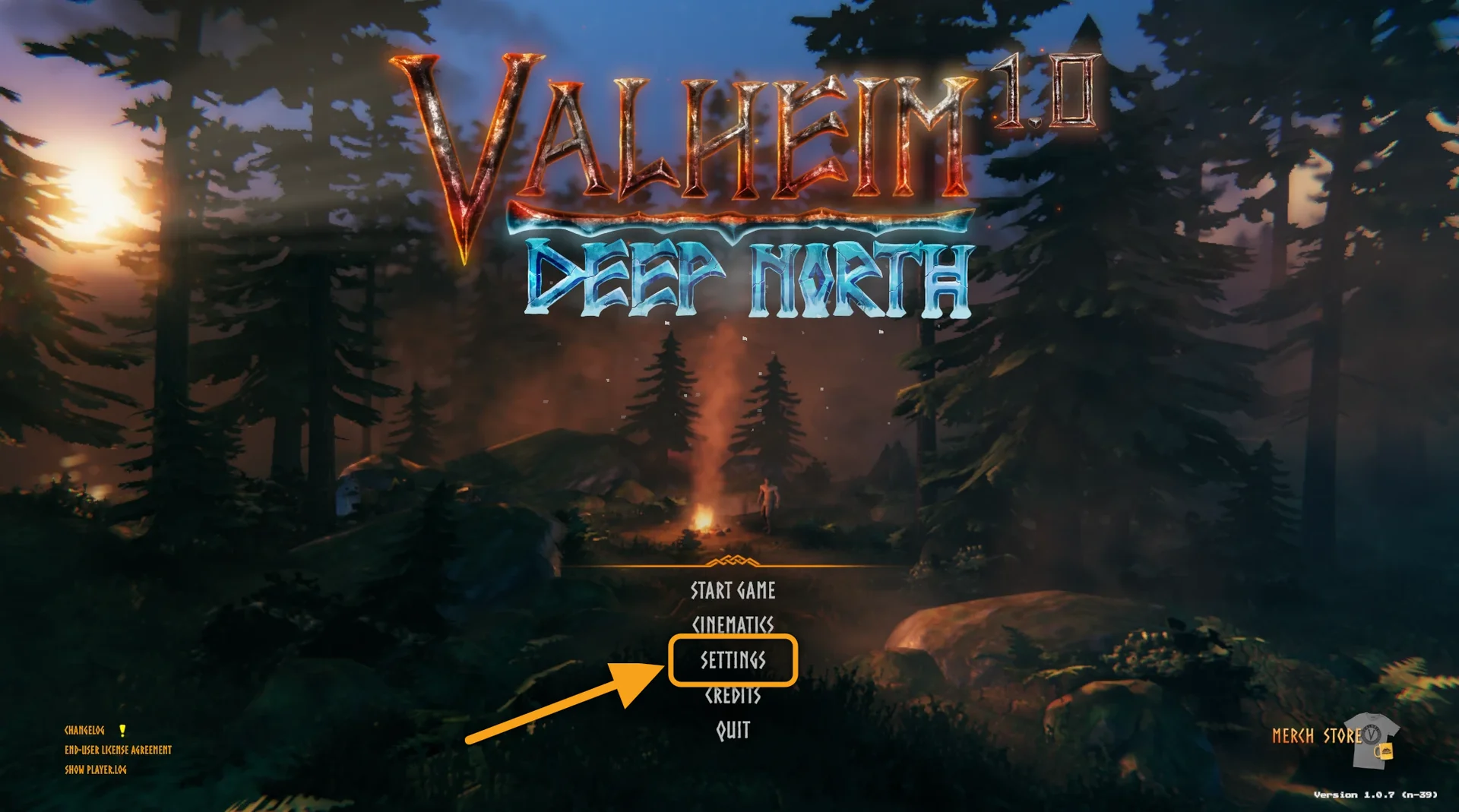
- Launch Valheim and open Settings from the main menu.
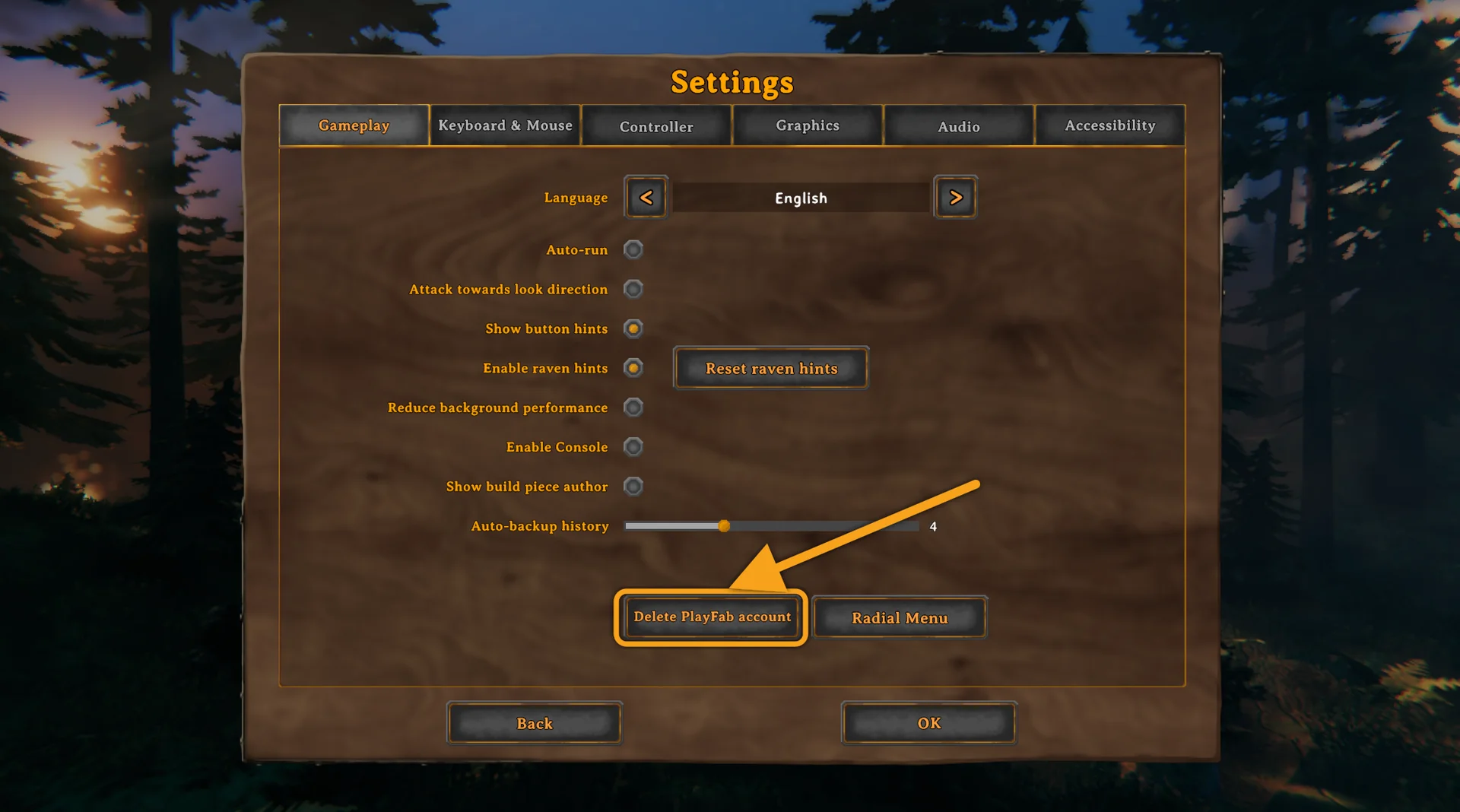
- Switch to the Gameplay tab and find Delete PlayFab account near the bottom.
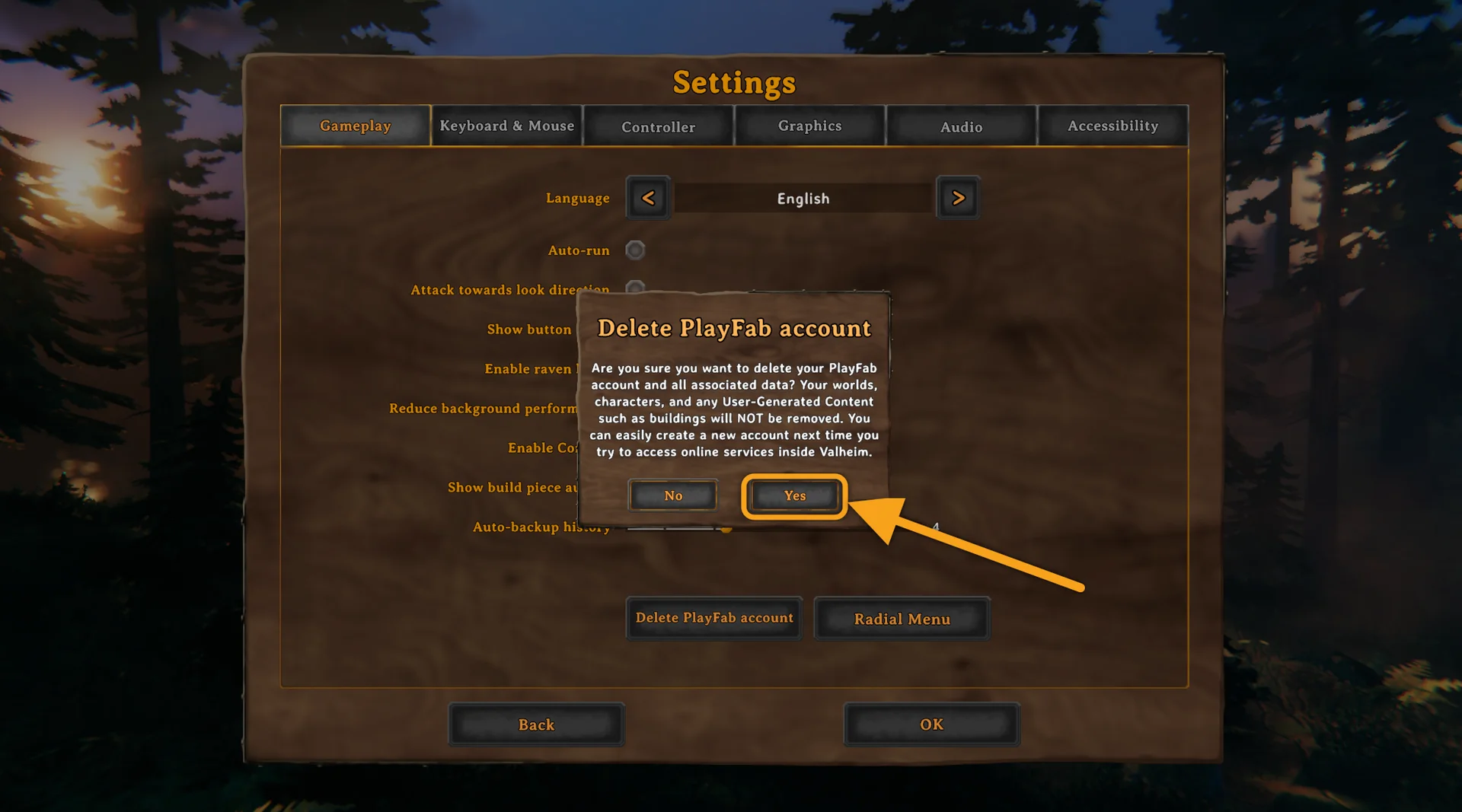
- Confirm with Yes. Read the dialog while it is up: the game itself states that no worlds, characters or buildings are removed.
- Stay in the game. Head back to the main menu, pick your character, open Join Game, choose Join IP and paste the address from the panel.
The step everyone skips
Do not close or restart Valheim between step 3 and step 4. Deleting the account only empties the slot. If you restart the game before connecting, Valheim notices the empty slot on startup, quietly creates a new PlayFab account, and you are back to "Failed to connect" with no idea why the fix did not work. Delete, then join by IP in the same session.
What you keep and what you lose
Nothing you care about is touched. Characters live in your own save folder, worlds live on the server, and the button reaches neither. Crossplay is not disabled for good either: the next time you join a server with a join code, Valheim creates a fresh PlayFab account in the background, exactly like it did the first time. The button is a reset, not a removal.
This is a PC-only button. Console players have no stored account to clear, and nothing one player deletes on their own machine affects anyone else or the server.
If the error is still there
- Check that the server is set to public. With crossplay off, Join IP asks the Steam query port for the server's Steam ID before connecting. A server with Public server off never answers, and the connection fails without a message. The SpillHosting panel turns Public server on for you when crossplay goes off, so this only bites if it was switched back by hand. Details in turning off crossplay on a Valheim server.
- Use the exact address from the panel. Copy the IP and port from the Overview tab, rather than an old entry in your in-game server list. Both connection methods are walked through in joining your Valheim server.
- Go through the full list of causes. Version mismatch, a server that is still booting, the wrong port and a few more are covered in fixing Failed to connect in Valheim.
Common questions
Will I lose my character or my world? No. The confirmation dialog says so, and it is right. Only the stored crossplay login goes.
Is this a one-time thing? Yes, once per PC. You only repeat it if the same symptom returns, for example after joining another crossplay server and then coming back to a Steam-only one.
Does it change anything for the other players? No. The account is local to your machine. The server does not know or care that you deleted it.
Can I fix it by reinstalling Valheim? No. The PlayFab account is stored outside the game files, so a reinstall leaves it in place. The button is the only clean way.
Every Valheim server from SpillHosting shows the Join IP address on the Overview tab of the control panel from the first start. See what is included on the Valheim server hosting page.
