
Desync in Valheim feels like a weak server, but it rarely is one. Players snap back a step, doors open a beat late, a troll hits you from a spot it has already left. Most of the time the cause is how Valheim splits the work between the players, or how much world data has to reach each of them. Below is the order we check things in when a customer asks us about it.
Quick diagnosis
Before you change anything, answer three questions. They point at the cause faster than any setting.
- Does the lag hit everyone, everywhere on the map? Look at crossplay first.
- Does it only happen in one area, or when one particular player is online? That points at zone ownership.
- Is it fine out in the wild but bad at your main base? That is the amount of data the base generates.
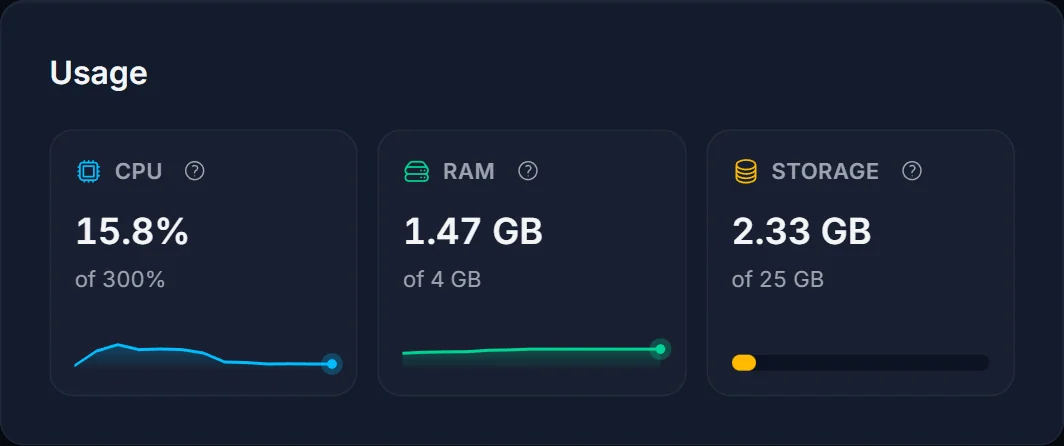
Open the Overview tab while the lag is happening and look at the Usage card. If CPU and RAM are well below their limits at the worst moment, the server has headroom, and more hardware will not change much.
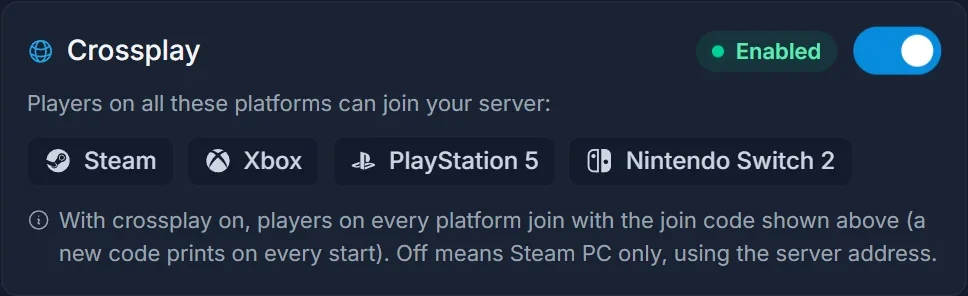
Steam only? Turn crossplay off
Crossplay sends every player, Steam players included, through Microsoft's PlayFab relay, and that extra hop costs latency. If nobody in your group plays on Xbox, PS5 or Switch 2, switch crossplay off on the Crossplay card and restart the server. Steam players then join with Join IP and the address from the Overview tab. Console players can no longer get in, so only do this for a Steam-only group. Step by step: turn off crossplay on your Valheim server.
One player can lag a whole area
Valheim hands each area of the map to the first player who walks into it. That player's PC runs the creatures and physics there, and the server passes the results on to everyone else. If that PC is slow or on shaky wifi, the whole group feels it, while the player responsible often notices nothing at all.
Test it: next session, let a different player enter the area first. If the lag moves with one person, ask them to use a cable, pause downloads and streams, and try again. If that does not help, the Serverside Simulations mod lets the server run those areas instead. It only goes on the server, but it is a community mod, so take a backup first and check that it has been updated for the game version you run.
Large bases and the 64 KB limit
The server sends each player at most around 64 KB of world updates per second. Every placed piece, chest, torch, item on the ground, tamed animal and terrain edit takes a share of that budget. In a big base the budget runs out, and things start arriving late.
Press F2 in game to see the instance count where you stand, then compare your base with open terrain. To bring the number down, spread your building over more than one base, tear down outposts nobody uses, clear item piles off the ground and keep the number of tamed animals sensible.
Better Networking is the mod that raises the limit and compresses the traffic. It only works when it runs on the server and on every player's PC. The original has not been updated in a long time and there are several copies under the same name, so pick one with a recent upload and read the comments before you install it. Mods go in through the Mods tab, which switches the server to BepInEx for you: installing mods on your Valheim server.
Mods and game updates
A mod written for an older version of the game can cause stutter without ever throwing an error. If the lag started right after a Valheim update, update your mods first. To rule mods out completely, switch the server back to Vanilla in the Mods tab for one evening and compare. Your world and settings are kept.
Freezes on a fixed rhythm
If the whole server freezes briefly at regular intervals, that is the world save. Backup Interval in the Startup tab controls it, in seconds. The default of 1800 (every 30 minutes) is a good value, and a very low number only gives you more frequent freezes.
Should you upgrade CPU or RAM?
Only if the Usage card says so. The Valheim server does most of its work on a single thread, so extra CPU threads rarely change desync, and extra RAM only helps when usage sits close to the limit. If one of them is pinned at its limit while you lag, an upgrade makes sense: upgrade or downgrade your server. Distance matters too: a server close to where most of you live beats a faster one far away.
FAQ
Is it the server when only I lag? Usually not. Check your own connection first, then whether you are the one who owns the area you are standing in.
Do we have to turn crossplay off? No. It is only worth it when everyone plays on Steam. With console players in the group, leave it on and work through the other sections.
Players get thrown off instead of lagging. That is a different problem, covered in Valheim Failed to connect: causes and fixes.
