
Players on PC connect to a Palworld dedicated server by typing its address, and that address is two parts: an IP and a port. The panel shows both together, so the only real job is getting that exact string to your friends without anyone shortening it on the way.
Console players are the exception, and they have their own section further down.
Before anyone can connect
The server is running. The server header in the panel shows Running with a green dot once it is up. A server that is still installing or starting will refuse every connection, however correct the address is.
The game versions match. Palworld updates often, and a client that has updated while the server has not (or the other way around) cannot connect. Restarting the server pulls the latest build.
Your players have the full address, and the password if you set one.
Where the address lives
Open your server in the control panel. The Overview tab opens first, and the connection card at the top holds the address with a copy button next to it.
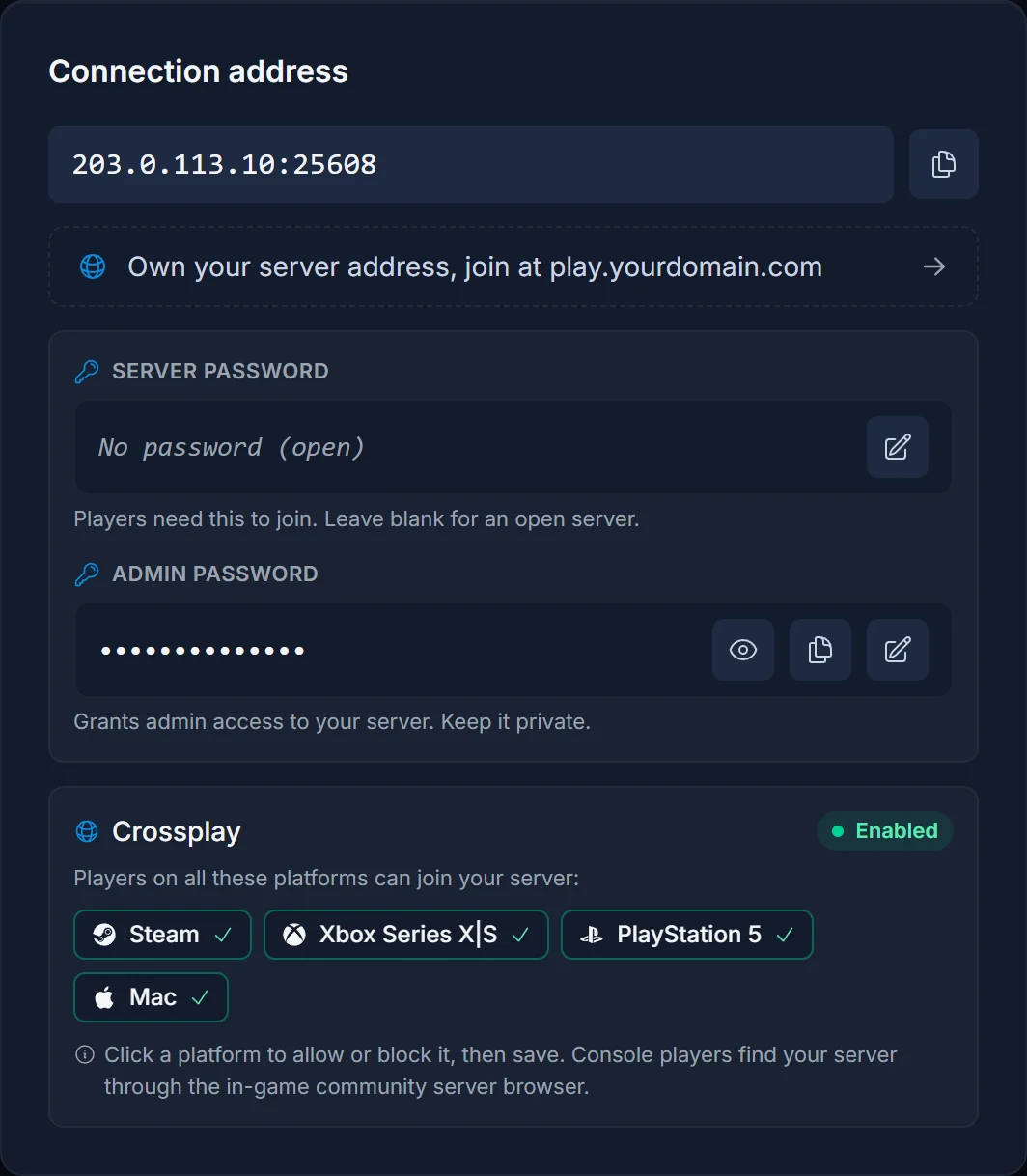
The copy button gives you the IP and port as one string, for example 203.0.113.10:25608. Send it exactly like that.
- The port is part of the address. Guides written for home servers mention port 8211. That is the default when you host on your own PC. Your server has its own assigned port, and without it the connection goes nowhere.
- Copy it rather than reading it out. One wrong digit looks like a broken server from the player's side.
You do not need to go back to Overview each time. The Join button in the server header opens the same address with its own copy button, from any tab.
Connecting from Palworld
- Start Palworld and choose Join Multiplayer Game (Dedicated Server) on the main menu
- Skip past the community server list. The field for a direct address sits at the bottom of that screen
- Paste the full
IP:portand press Connect - Enter the server password if you are asked for one
- Create a character. Characters belong to the server, not to the player's account, so everyone starts fresh the first time they join yours
The first connection to a world with a lot of progress can take a minute or two while it loads. Give it time before retrying.
Passwords
The Overview tab also has a card for the server's two passwords, and they are not interchangeable.
- Server password. What players type to get in. Empty means anyone who has your address can join. Set one if the server is only for people you invite.
- Admin password. For running admin commands yourself. Keep it to yourself and never hand it to players as the join password.
Both are read at boot, so restart the server after changing either one.
Console players and crossplay
Since Palworld 1.0, Steam, Xbox Series X|S, PlayStation 5 and Mac players can share one dedicated server. The crossplay card at the bottom of the Overview tab lists which platforms are currently allowed, and clicking a platform blocks or allows it. Restart afterwards so the change takes effect.
Xbox and PlayStation have no field for typing an address. Console players have to find the server by name in the community server list, which only works if the server is listed publicly and has a name nobody else is likely to use. A generic name gets lost among hundreds of others, so pick something distinctive and tell your console friends exactly what to search for.
Troubleshooting
"Connection failed" straight away. Usually a retyped address or a missing port. Send the copied string again, then check that the header says Running.
It worked yesterday and fails today. A game update. Restart the server so it pulls the same build as the players.
A console player cannot find it. The server has to be listed publicly with a searchable name, and their platform must be allowed on the crossplay card. Right after a restart it can take a minute or two before it shows up in the list again.
Strangers are joining. No server password is set. The password card shows the server as open in that case. Set one and restart.
A player's character is missing. They joined a different address than before, or the world save was swapped. Characters are stored per server, so the address has to be identical every time.
Frequently asked questions
Where is my Palworld server IP? On the Overview tab, in the connection card at the top. The copy button gives you IP and port together.
Which port should my friends use? The one shown in the connection card. It is assigned per server and is normally not 8211.
Can Steam and Xbox players play on the same server? Yes. Crossplay is on by default, and the crossplay card on Overview lets you turn individual platforms off.
Why can my console friends not type the IP? Consoles do not offer a direct connect field in Palworld. They join through the community server list by searching for the server name.
Does changing the password kick everyone? Nothing changes until the server restarts, and the restart disconnects everyone anyway. After that, players need the new password to get back in.
Address correct, server running, and still nobody gets in? Contact support with your server name and we will look from our side. No server yet? See our Palworld server hosting plans.
